



Herdr is what happens when tmux grows up next to Claude Code. The herdrdev/herdr repository gained about 2,196 stars in a single week in mid-November 2026 and shows roughly 50,100 stars and 4,050 forks on GitHub. The tagline on herdr.dev is blunt: the runtime your coding agents live on.
That is a different problem from Worktrunk’s Git worktrees or Agentplane’s side-by-side harness control. Herdr does not choose your branch layout. It keeps terminal panes alive, visible, and addressable while long-running agents think, ask questions, or wait on tools.
TL;DR
| Question | Answer |
|---|---|
| What is it? | Rust terminal multiplexer and TUI for coding agents |
| Stars (Nov 2026)? | ~50.1k on GitHub; +2,196 stars that week per trending data |
| License? | Apache-2.0 |
| Install? | Official curl install script on herdr.dev, or brew install herdr |
| Detach? | Ctrl+b q detaches; herdr reattaches per README |
| Agents supported? | Claude Code, Codex, Cursor, OpenCode, Grok, and others via integrations |
| Agent API? | CLI plus socket API; skill at skills/herdr in the repo |
| Compare to tmux? | Agent status, multi-machine inbox, restore hooks, marketplace plugins |
Why long agent sessions need a new multiplexer
A coding agent session is not a five-minute vim edit. It is a long I/O-bound process that spends most of its time waiting on model tokens, sandbox tools, tests, and human answers. If you close the laptop lid, drop SSH, or kill the terminal tab, you lose context unless something server-side keeps the pane alive.
Classic tmux solves process persistence, but it does not know that pane three is blocked on a Claude Code permission prompt while pane one is still working. Herdr’s README promises pane marks: working, blocked, or idle, and an alert when an agent needs you.
For teams running several agents at once — the pattern we covered in loop engineering for coding agents and what is an agent harness — that visibility is the difference between checking every tab and glancing at one board.
What Herdr actually ships
The GitHub README lists the product pillars that matter for builders.
Detach without stopping work. Herdr runs terminals in a background server. Detaching does not kill the agent process. After a machine or server restart, Herdr can restore the saved layout and resume supported agent sessions; the README is explicit that original OS processes do not survive a hard reboot — session state is what comes back.
Several machines, one window. Local panes and saved SSH machines can share one UI, with a combined agent list and independent reconnects. That targets the common pattern: laptop for editing, remote GPU box for experiments, both visible without juggling five Terminal windows.
Agent-native control. Agents can drive Herdr through the CLI and socket API — spawn panes, send prompts to each other, and block until another agent is genuinely waiting. Agent authors can follow herdr.dev/docs integration pages; the repo includes AGENTS.md for automated contributors.
Runs what you already run. Herdr does not replace Claude Code commands, Codex, or Cursor. It hosts their terminals. The project tracks almost 1,880 commits on master, signalling active maintenance rather than a weekend hack.
Install and quick start
Official install paths from the README:
curl -fsSL https://herdr.dev/install.sh | sh
Package routes also include brew install herdr, mise use -g herdr, and Windows installers linked from herdr.dev. After install, start the server where work should live:
herdr
Run agents inside panes, split as needed, then detach with Ctrl+b q and reattach later with herdr, matching the README quick-start flow documented at herdr.dev/docs.
Developers building from source use Rust:
git clone https://github.com/herdrdev/herdr
cd herdr
cargo build --release
The repo’s just test and just check targets cover formatting and unit tests per CONTRIBUTING.md.
How the agent board shows pane state
Herdr’s marketing site shows community layouts — kanban boards, radar skins, command centers — but the functional idea is consistent: every pane reports state so you do not hunt for the stuck agent.
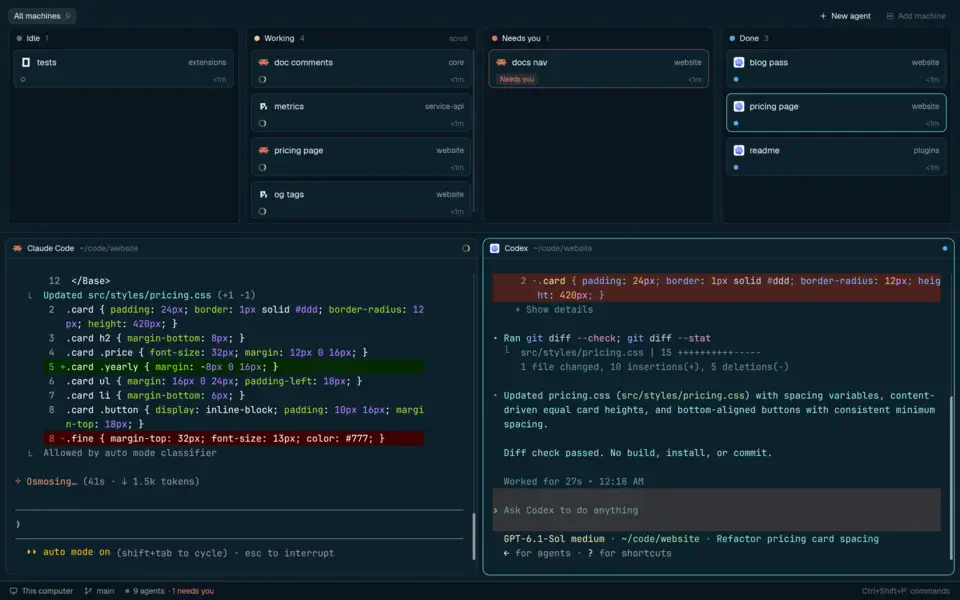 Herdr agent terminal runtime marking panes working blocked or idle on an agent board layout
Image: Herdr
The mobile pages at herdr.dev document phone and foldable layouts: an Inbox sorted by needs you, done, working, and idle, plus full terminals on device.
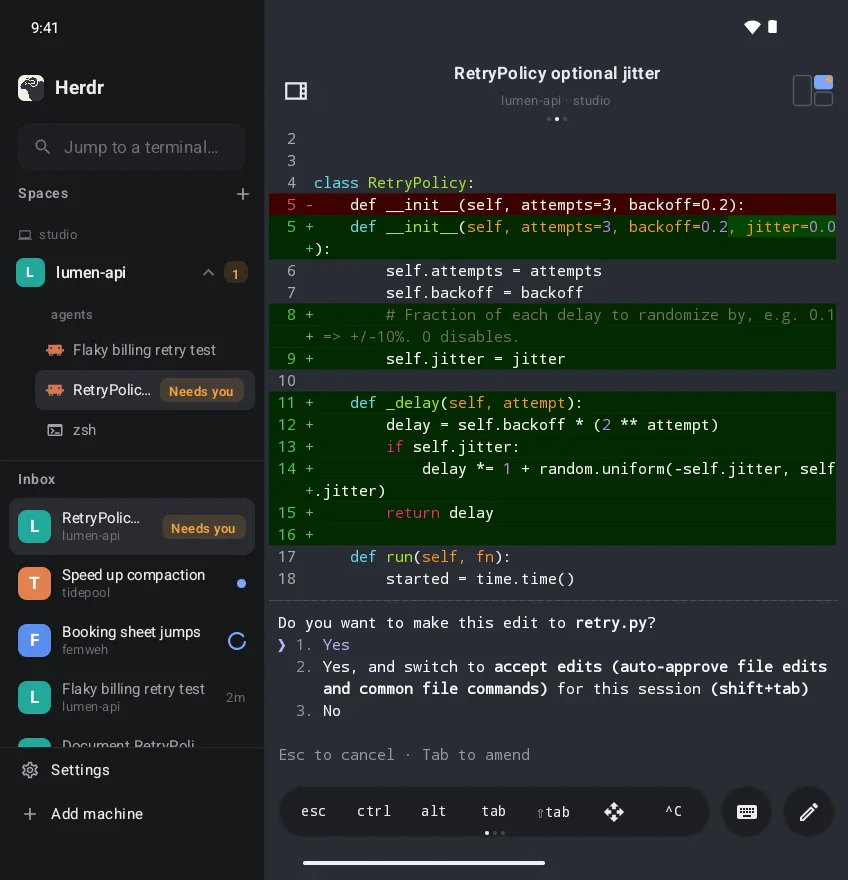 Herdr coding agent runtime on a foldable phone with sidebar and Claude Code terminal
Image: Herdr
That matters when you step away from a desk but still owe an agent an approval click — a pattern that also shows up in Claude Code mobile coverage, but Herdr centralizes many panes rather than one session.
Socket API, skills, and plugins
Herdr documents a socket API under integrations on herdr.dev/docs. Combined with the skills/herdr tree in the repository, that lets agent harness authors treat panes as programmable resources — spawn work, fan out subtasks, synchronize on blocked states.
There is also a plugin marketplace linked from the README for pane workflows. If you already standardize on agent skills elsewhere, Herdr is closer to infrastructure: the terminal daemon and TUI that skills can call, not another skill registry.
Compare mentally to OpenAI’s Pando Git backend: Pando speeds Git for Codex; Herdr speeds human plus multi-agent terminal orchestration. They solve adjacent bottlenecks in large agent rollouts.
How Herdr fits next to worktrees and orchestrators
| Layer | Tool example | What it optimizes |
|---|---|---|
| Branch isolation | Worktrunk | One folder per branch per agent |
| Harness control plane | Agentplane | Pick which agent CLI runs where |
| Terminal persistence | Herdr | Keep panes alive, show blocked state, remote SSH inbox |
| Cloud agents | Codex cloud tasks | Offload runs to OpenAI infra |
Most production setups will mix layers: Worktrunk for repo hygiene, Herdr for terminal durability, your chosen harness for model access.
Risks and honest limits
Supported session restore is not magic. After a full machine restart, OS processes die; Herdr restores layout and supported agent session state, not every in-flight kernel buffer. Plan long jobs with logging and Git commits, not only pane memory.
Security on SSH machines. Combining local and remote panes in one UI increases convenience and attack surface. Treat saved SSH machines like production credentials; restrict who can attach to a shared Herdr server.
Plugin supply chain. Marketplace plugins extend panes. Review plugin source the same way you review npx skills installs.
Rust binary weight. Herdr ships one binary instead of Electron, but you still run a persistent server. On memory-constrained VMs, compare against plain tmux plus your own status scripts.
What people are asking
Do I need Herdr if I only run one Claude Code tab? Probably not. One terminal tab and careful tmux habits cover that case.
When does Herdr pay off? When you routinely run three or more agents, mix local and SSH machines, or lose work because SSH dropped mid-run.
Does it work with Codex Security scans? Herdr hosts the terminal; Codex Security still runs as its own CLI inside a pane. Detach while a long scan runs, but watch subscription usage limits noted in our November update to that post.
Is it only for Claude? No. README lists Codex, Cursor, OpenCode, and Grok with integration docs for adding new agents.
Building Herdr support into your agent
If you maintain a harness or internal coding bot, Herdr’s docs split the integration path into three practical steps worth copying even if you never ship a pane UI.
Read AGENTS.md first. The repository root AGENTS.md tells automated contributors where tests live and which commands must pass before a pull request. Any agent that edits Herdr itself should treat that file as ground truth, similar to how we recommend reading DESIGN.md in agent UI template posts.
Expose spawn and wait primitives. The socket API is the extension point. Instead of shelling out to osascript or brittle tmux send-keys, your harness can ask Herdr to create a pane, stream status, and block until another agent hits a blocked state. That is the same coordination problem WorkflowArena benchmarks at the task level — Herdr tries to solve it at the terminal layer.
Document human override paths. Herdr marks panes when input is required. Your agent policy should still require a human for destructive commands, matching Bernstein policy-as-code patterns. The multiplexer makes blockers visible; it does not replace approval gates.
Test detach and reattach in CI sparingly. Full TUI tests are flaky in headless runners. The README’s Rust just test suite is the reliable gate; treat Herdr integration tests as optional smoke jobs on a machine with a real terminal.
Why Rust for this layer
Several Hacker News threads in 2026 argued that agent infrastructure is shifting from Python scripts to long-lived concurrent binaries because agents wait on I/O. Herdr is explicitly one Rust binary, no Electron, which keeps RAM stable when dozens of panes stay open overnight. That does not make Rust mandatory for your own tools, but it explains why teams accept a new multiplexer instead of extending tmux with shell scripts.
Herdr also vendors ghostty-vt under crates/ per the repository tree, signalling VT emulation cared about by the authors rather than reused from a web view. For comparison, GitHub’s Copilot runtime Rust rewrite chased latency in a different layer — inference-adjacent services — with the same language bet.
Related on explainx.ai
- Worktrunk: Git worktrees for parallel agents
- Agentplane local control plane
- What is an agent harness?
- Loop engineering with coding agents
- Claude Code commands reference
- Top open and closed agent harnesses
- npx skills install guide
Official
Star counts and feature list reflect the public README and herdr.dev as of November 11, 2026 — re-check releases before you standardize team infra.