




If your IT department just handed you a Microsoft 365 Copilot license, or you're the one deciding whether to buy 500 of them, the first question is usually the same: what is this thing actually going to do differently from typing into ChatGPT? The short answer is grounding — Copilot reads your organization's own emails, meetings, chats, and files through Microsoft Graph, something a general chatbot simply cannot do. This guide walks through what Microsoft 365 Copilot is, how it works, where it lives inside Word, Excel, PowerPoint, Outlook, and Teams, what it costs, and how it differs from both consumer Copilot and ChatGPT.
This is the first post in explainx.ai's Microsoft Copilot series — see the Related reading section for app-specific guides and the Copilot Studio posts if you're evaluating custom agents beyond the built-in apps.
TL;DR
| Question | Answer |
|---|---|
| What is it? | An AI assistant built into Word, Excel, PowerPoint, Outlook, and Teams, grounded in your own Microsoft 365 data. |
| What powers it? | OpenAI models, orchestrated through Microsoft's own architecture, plus Microsoft Graph for grounding. |
| What does it cost? | $30/user/month (annual term), added on top of a qualifying Microsoft 365 plan. |
| Do I need a paid license to use any Copilot? | No — Copilot Chat (web-grounded only) ships free with any Microsoft 365 subscription. |
| How big is it? | 20M+ paid enterprise seats as of Microsoft's FY2026 Q3 earnings call, up roughly 5M seats in one quarter. |
| How is it different from ChatGPT? | ChatGPT reasons over the open web and what you paste in. Copilot reasons over your actual work data, respecting your existing permissions. |
| Where do I build custom agents? | Copilot Studio — a separate, low-code product for workflows beyond the built-in apps. |
What is Microsoft 365 Copilot?

Microsoft 365 Copilot is Microsoft's AI assistant embedded directly inside the Microsoft 365 apps you likely already use every day. It is not a separate app you switch to — it's a panel, a chat pane, or an inline suggestion that shows up in Word while you draft, in Excel while you build a model, in Outlook while you triage a full inbox, and in Teams while you sit in (or missed) a meeting.
The core mechanism that makes it different from a generic chatbot pasted into a sidebar is grounding. Every Copilot response can pull from three sources, in Microsoft's own architecture: the underlying large language model's general knowledge, the open web (when enabled), and — critically — your organization's own content in Microsoft Graph: your emails, calendar, chats, meeting transcripts, and the SharePoint and OneDrive files you already have permission to open. Copilot never sees content you couldn't already access yourself — it inherits your existing permission boundaries, not new ones.
That grounding step is also why a beginner's first Copilot prompt matters more than it looks. Asking "summarize Q3 sales" gets a generic non-answer from ChatGPT. The same prompt in Microsoft 365 Copilot, run from Outlook or the standalone Copilot Chat app, can pull your team's actual Q3 sales deck, the email thread arguing about the numbers, and last week's Teams meeting recap — because it's grounded in your tenant, not the internet.
How Microsoft 365 Copilot works
Under the hood, a Copilot request runs a loop that looks similar to any modern agent harness: the assistant interprets your prompt, decides what Graph data is relevant, retrieves it (respecting your permissions), reasons over the retrieved content plus the underlying model, and drafts a grounded response. Microsoft calls this general shape "grounding" in its own architecture documentation, and it is the single biggest technical difference between Microsoft 365 Copilot and a standalone chatbot.
This inner loop runs per turn — it plans, retrieves, and answers once per prompt, inside a single chat exchange. It does not persist as a standing background job. If you're looking for Copilot to run on a schedule or fire when a new record appears without you typing anything, that is a different product: see how to run loops in Microsoft 365 Copilot for exactly where the built-in apps stop and where Copilot Studio picks up.
Where Microsoft 365 Copilot lives
Copilot isn't one interface — it's the same grounded assistant surfaced differently in each app, tuned to that app's job:
| App | What Copilot does there |
|---|---|
| Word | Drafts, rewrites, and summarizes documents from a prompt or from other files you point it at |
| Excel | Explains formulas, generates analysis, highlights trends, and answers questions about your data in plain language |
| PowerPoint | Turns a Word doc or outline into a formatted slide deck, and rewrites individual slides on request |
| Outlook | Drafts replies, summarizes long threads, and triages a backlog inbox |
| Teams | Summarizes meetings you missed, tracks action items, and answers questions inside a chat or channel |
| Copilot Chat | A standalone chat surface — free tier is web-grounded only; the paid tier adds your tenant's Graph data |
| Agent Builder | Lets individuals or small teams build lightweight Q&A agents grounded in SharePoint sites or files they can access |
Each app-specific guide in this series goes deeper — see Copilot in Excel, Copilot in Word, and Copilot in Teams for meeting recaps.
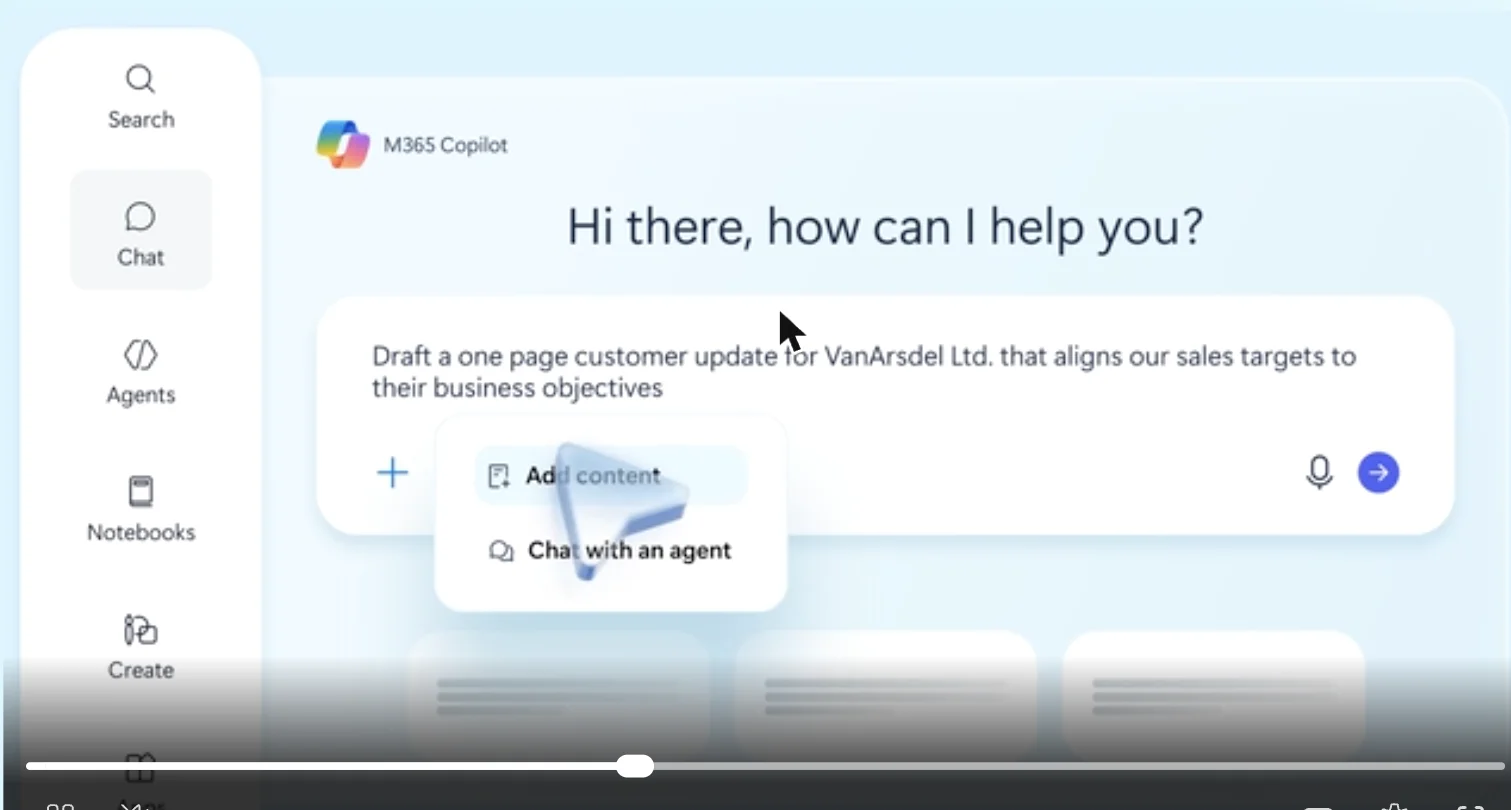
Screenshot: the Microsoft 365 Copilot Chat + Cowork interface, from Microsoft's official Microsoft 365 Copilot product page.
What Microsoft 365 Copilot costs
As of August 2026, Microsoft lists Microsoft 365 Copilot at $30 per user per month on an annual term for enterprise customers — an add-on layered on top of a qualifying base plan (Business Standard, Business Premium, E3, or E5), not a standalone product you can buy alone. Microsoft also ships a lower-cost Copilot Business SKU and bundled options for smaller teams, and free Copilot Chat ships with every Microsoft 365 subscription at no additional cost, though it's limited to web grounding plus manually uploaded files rather than your tenant's Graph data.
That distinction — Copilot Chat versus the full $30/user/month Microsoft 365 Copilot — is the most common point of confusion for someone new to the ecosystem. If your organization data doesn't show up in answers, you're very likely on the free Copilot Chat tier, not the paid one.
For the full breakdown of SKUs, bundles, and what changed with Microsoft's July 2026 base-suite price increases, see Microsoft 365 Copilot pricing and licensing.
How many people are actually using it
Microsoft reported that Microsoft 365 Copilot crossed 20 million paid enterprise seats on its fiscal year 2026 third-quarter earnings call — adding roughly 5 million seats in a single quarter, the fastest three-month growth reported since Copilot launched, with seat adds up 250% year over year. Microsoft also disclosed it quadrupled the number of customers paying for more than 50,000 seats each; Bayer, Johnson & Johnson, Mercedes-Benz, and Roche each exceed 90,000 seats, and Accenture's deal for over 740,000 seats was called the company's largest Copilot win to date. Copilot queries per user were reportedly up nearly 20% quarter over quarter, with weekly engagement now at the same level as Outlook itself.
Those numbers matter for a beginner mainly as a sanity check: if your company is rolling out Copilot to your team, you're joining a rollout that's now standard in large enterprises rather than an early experiment.
Microsoft 365 Copilot vs. consumer Copilot vs. ChatGPT
This is where most beginners get confused, because "Copilot" is a single brand name Microsoft applies to several different products:
| Product | Grounded in | Who it's for | Cost |
|---|---|---|---|
| Microsoft 365 Copilot | Your org's Microsoft Graph data (emails, files, meetings) | Enterprise/business users in Word, Excel, Outlook, Teams | $30/user/month add-on |
| Copilot Chat (free tier) | Open web + manually uploaded files | Anyone with a Microsoft 365 subscription | Included at no extra cost |
| Microsoft Copilot (consumer) | Open web, your Windows/Edge context | Individual consumers on Windows or Edge | Free, or bundled in Microsoft 365 Personal/Family |
| GitHub Copilot | Your code repository | Developers writing code | Separate product, separate pricing |
| ChatGPT | Open web + what you paste into the chat | General-purpose, any use case | Free tier + paid tiers, no Microsoft tenant access |
The practical rule: ChatGPT and consumer Copilot answer from the open web and whatever you type in. Microsoft 365 Copilot answers from your actual work. That's the entire pitch, and it's also the entire privacy and permissions consideration — Copilot only surfaces content you could already see yourself, but it surfaces it a lot faster and synthesized across sources you'd never have manually cross-referenced.
If you're specifically comparing the developer tools — GitHub Copilot against Claude Code, Cursor, and others — see Claude Code vs Cursor vs GitHub Copilot, a different comparison than the one in this post.
Beyond the built-in apps: Copilot Studio
Everything above covers what ships out of the box inside Word, Excel, Outlook, and Teams. If you need Copilot to do more than answer a chat turn — run on a schedule, fire when a record changes in your CRM, or execute a multistep approval workflow — that's a separate Microsoft product called Copilot Studio, a low-code agent builder with over 1,500 connectors. Start with what is Microsoft Copilot Studio and how to build your first agent, and see the applied guides for an IT helpdesk agent and an HR onboarding agent once you're ready to go beyond the default apps.
What this means for what you build or pay
| If you're a... | Start here | Then |
|---|---|---|
| Individual user just given a license | Copilot in Outlook/Word/Teams — no setup required | Try Copilot in Excel for analysis work |
| IT/procurement evaluating the buy | Pricing and licensing guide | Budget $30/user/month on top of your base M365 plan |
| Someone who needs automation, not chat | How to run loops in M365 Copilot | Copilot Studio for schedules and triggers |
| A developer, not an office worker | GitHub Copilot instead | Compare against Claude Code and Cursor |
Related reading
explainx.ai Microsoft Copilot series
- Update — September 25, 2026: Microsoft relaunched the whole Copilot app around three new capabilities — Home, Code, and a persistent Autopilot agent: Copilot's Home, Code, and Autopilot relaunch, explained →
- Microsoft 365 Copilot pricing and licensing guide
- Microsoft Copilot in Excel guide
- Microsoft Copilot in Word guide
- Microsoft Copilot in Teams: meeting recaps
- How to run loops in Microsoft 365 Copilot
- What is Microsoft Copilot Studio? Build your first agent
- Copilot Studio: IT helpdesk agent guide
- Copilot Studio: HR onboarding agent guide
Related on explainx.ai
- How to run loops in GitHub Copilot
- Claude Code vs Cursor vs GitHub Copilot
- GitHub Copilot: 87% of LLM calls are agent-initiated
Dictionary
Microsoft documentation
- Microsoft 365 Copilot pricing
- Microsoft Graph overview
- Choose between Microsoft 365 Copilot and Copilot Studio
- Microsoft FY2026 Q3 earnings — Productivity and Business Processes
Pricing, seat counts, and product boundaries reflect Microsoft's public disclosures as of August 2026. Copilot features and licensing vary by tenant, region, and rollout wave — confirm current terms with Microsoft before purchasing.