



Level 1 IT tickets are the most repetitive, most measurable, and most automatable queue in most companies — password resets, VPN drops, "why can't I install this," and "where's my ticket." Microsoft's own IT Helpdesk template for Copilot Studio exists specifically because that queue is where enterprise AI agents pay for themselves fastest, or fail loudest if governance is an afterthought.
This is a practitioner's guide, not a feature tour. If you're an IT admin deciding whether to build this, you need to know exactly what the agent can resolve on its own, what it should never be allowed to touch, and how the ServiceNow/Jira/Zendesk wiring actually works in 2026 — MCP versus connectors, not marketing copy.
This post is the third in explainx.ai's Copilot Studio series. Start with what Copilot Studio is and how to build your first agent if you haven't yet, and see the sibling guide on building an HR onboarding agent in Copilot Studio for the same pattern applied to a different department. If you're still sorting out Copilot Studio from Microsoft 365 Copilot and GitHub Copilot, the beginner's guide to Microsoft 365 Copilot untangles the naming first.
TL;DR — what this agent can and can't automate
| Task | Can it automate? | Notes |
|---|---|---|
| Password reset (Entra ID / SSPR) | Yes, fully | Triggered via Power Automate flow calling Entra self-service password reset; zero human touch for a standard reset. |
| MFA re-registration | Yes, fully | Same pattern — deterministic action against Entra ID. |
| Software install request (approved catalog) | Yes, with approval step | Agent creates the request; a manager or IT approval flow signs off before install runs. |
| VPN connectivity troubleshooting | Partial | Agent runs a scripted diagnostic tree (client version, known outage, config check); root-cause fixes past that go to a human. |
| Access/permission requests (non-standard) | No — triage only | Agent captures the request and context, opens a ticket, routes to the right approver. It doesn't grant access itself. |
| New ticket creation in ServiceNow/Jira/Zendesk | Yes | Via connector or MCP server, with full ticket fields populated from the conversation. |
| Ticket status lookup | Yes | Read-only query against the ITSM system, scoped to the requester's own tickets. |
| Ticket triage and routing | Yes | Classifies urgency/category and assigns queue based on keywords and topic match. |
| Diagnosing hardware failure | No | No physical inspection path; agent can log the ticket and dispatch, not diagnose. |
| Security incident judgment calls | No — must escalate | Anything security-adjacent (suspected phishing, account compromise) routes to a human by design, not automated. |
| Deciding who should have access to what | No | That's a policy decision enforced by DLP and connector permissions, not something the agent reasons about at runtime. |
The real use case: what Level 1 tickets look like
Before opening Copilot Studio, look at what's actually filling the queue. Across most helpdesks, Level 1 tickets cluster into a small number of repeatable categories: password resets, MFA lockouts, VPN or network access issues, software install/license requests, and "how do I" questions that already have a documented answer. None of these require judgment — they require consistent execution against a known procedure, which is exactly what an agent does well and a person does inconsistently at 4pm on a Friday.
The categories that don't belong to the agent are just as important to name up front: anything security-adjacent, anything requiring physical hardware access, and anything where the "right" answer depends on organizational context the agent doesn't have (should this contractor get admin rights on this one machine). Building the escalation path for those cases is not an afterthought — it's half the actual design work, covered below.
Building it: start from the IT Helpdesk template
Copilot Studio ships a purpose-built starting point rather than a blank canvas. At copilotstudio.microsoft.com, the IT Helpdesk template comes preconfigured with topics for common requests and a path to ServiceNow for anything it can't resolve — Microsoft's own template description notes it "can provide self-service options for common tasks, such as password resets or software installations" and, when it can't surface an answer, helps the employee "create a ServiceNow ticket to escalate their issue to the correct support team."
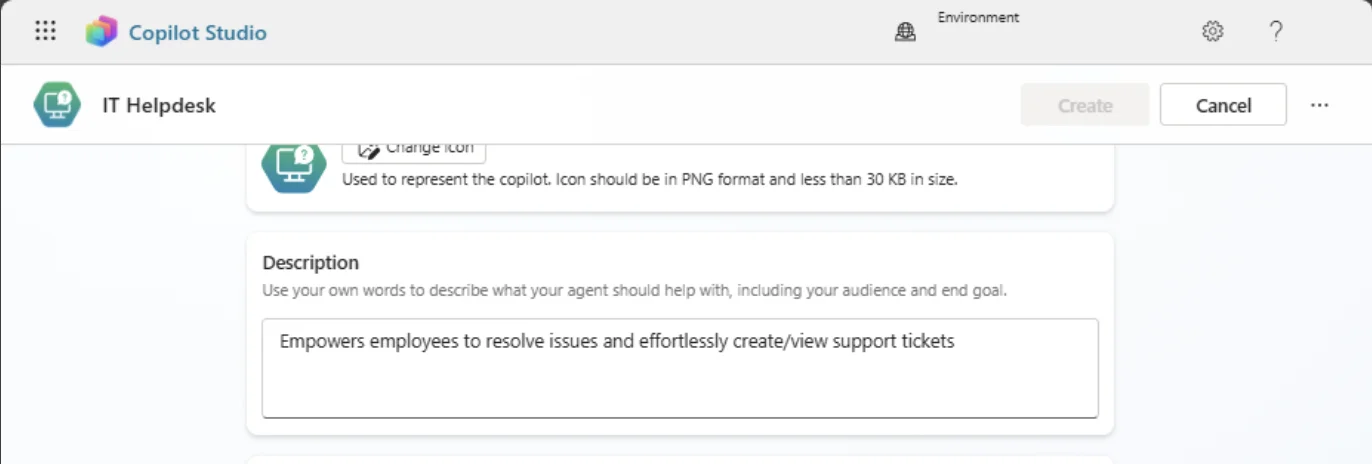
Screenshot: the real IT Helpdesk agent setup screen in Copilot Studio, from Microsoft's official "IT Helpdesk" template documentation.
Starting from the template rather than a blank agent saves the cold-start work of writing topic triggers and conversation flows from scratch. What you still have to do:
- Connect knowledge sources. Point the agent at your actual IT knowledge base — SharePoint, a Confluence space, or uploaded documents — so answers come from your documented procedures, not the model's general training data.
- Wire the deterministic actions. Password reset and MFA flows need a Power Automate flow calling Entra ID's self-service reset API, triggered from a topic in the agent. This is the difference between an agent that tells someone how to reset a password and one that does it.
- Connect the ticketing system. Covered in detail below — this is where most of the real integration work lives.
- Author the triage logic. Map incoming request types to categories, priority, and routing queue. The template gives you a starting taxonomy; most teams adjust it to match their existing ITSM categories so tickets land in the same queues staff already work from.
- Set the escalation boundary explicitly. Decide, in writing, which topics the agent is allowed to resolve autonomously and which always create a ticket for a human — see the escalation section below before you publish anything.
Connecting to ServiceNow, Jira, or Zendesk
This is where the 2026 landscape has genuinely shifted: Model Context Protocol (MCP) servers are becoming the preferred integration path for ITSM tools in Copilot Studio, running alongside the older connector model rather than replacing it outright.
ServiceNow
ServiceNow has the deepest native path. Microsoft Learn documents wiring a ServiceNow MCP server directly into an agent, and community-built connectors go further — one open Power Platform connector wraps more than 90 operations across 13 ServiceNow APIs into a single MCP-compatible interface with dynamic table schema discovery, which means the agent can query and act on ServiceNow tables beyond just the incident/ticket object without a custom connector per table.
Jira
Atlassian's Remote MCP server (branded Rovo) gives a Copilot Studio agent direct JQL search, issue creation, and Confluence/Compass lookups without a bespoke connector. Note that Atlassian sunset the older SSE-based MCP transport on June 30, 2026 — if you're following a walkthrough written before that date, the setup steps for the transport layer have changed; use the current streamable-HTTP setup instead.
Zendesk
Zendesk is reachable through Microsoft's Copilot connectors framework and standard or custom Power Platform connectors, though it doesn't yet have the same first-party MCP tutorial depth as ServiceNow or Jira as of this writing. A custom connector against Zendesk's REST API remains the reliable path if an off-the-shelf MCP server isn't available for your instance.
MCP versus connector: which one to use
| Power Platform connector | MCP server | |
|---|---|---|
| What it exposes | A fixed set of predefined actions | A dynamic tool list the agent can reason over at runtime |
| Setup effort | Lower if a certified connector already exists | Higher initial setup, more flexible once running |
| Governance | Managed entirely through Power Platform DLP policies | Still governed by DLP, but tool scope is defined by the MCP server, not just the connector definition |
| Best fit | Well-defined, stable actions (create ticket, get status) | Broad, evolving API surfaces (ServiceNow's full table set) where hand-building a connector per operation doesn't scale |
For a helpdesk agent, a hybrid is common in practice: connector for the narrow, high-frequency actions (create ticket, check status), MCP for anything that benefits from letting the agent discover and select from a wider action set.
Designing the human handoff
The single most important design decision in this build is not the connector — it's the escalation boundary. Copilot Studio has a built-in Escalate system topic that, by default, does nothing more than tell the user to contact support directly. To make it functional, add a Transfer Conversation node, which hands off the full chat history and captured variables to a live agent channel rather than making the person start over.
A few things worth knowing before you rely on this:
- A basic handoff needs no engagement hub. Transferring to a Teams channel, a webhook, or a simple queue is achievable with the Transfer Conversation node alone.
- A true omnichannel handoff — presence, skill-based routing, queue management — requires Dynamics 365 Customer Service or another engagement hub behind Copilot Studio. The agent can message a live-chat solution using the M365 Agents SDK while staying in control of the conversation, but it isn't running a contact-center queue by itself.
- Escalate on ambiguity, not just failure. The template's default only escalates when the agent can't find an answer. A production helpdesk agent should also escalate deliberately on category — security-adjacent requests, anything touching a VIP or executive account, and anything where the confidence score on intent classification is low — even when it technically "found" a plausible-looking response.
- Preserve context on handoff. The value of a good handoff is that the human doesn't re-ask everything the user already said. Verify the variables you're capturing (device, error message, ticket number if one exists) actually get passed through to the receiving channel, not just logged.
Testing and publishing to Teams
Copilot Studio's test pane inside the authoring canvas is the first pass — walk through the actual conversation paths a real user would take, including ones that should fail gracefully (ambiguous requests, out-of-scope questions, requests that should escalate). Before publishing broadly:
- Test the deterministic actions against a non-production tenant if at all possible — a password reset flow that misfires against production Entra ID is not a bug you want to discover live.
- Confirm the escalation path actually delivers by triggering it end-to-end, not just checking that the Transfer Conversation node exists in the topic canvas.
- Publish to Microsoft Teams as the primary channel for an internal IT helpdesk agent — it's where employees already are, and it avoids standing up a separate web widget most people won't remember to open.
- Pilot with one department or floor before a company-wide rollout, and watch the actual ticket deflection rate against your existing ServiceNow/Jira/Zendesk metrics rather than assuming the pilot numbers generalize.
Independent write-ups from teams running this in production report 40-60% reductions in tier-1 ticket volume within three months, with each fully automated resolution saving roughly 35+ minutes of support staff time — meaningful at scale, but dependent on having genuinely deterministic Level 1 workflows to automate against in the first place. A helpdesk with undocumented, inconsistent Level 1 procedures won't see those numbers; the agent needs a clean process to encode, not a messy one to guess at.
Governance: DLP and who can query what
This is the section IT admins should read before the demo, not after the rollout. Copilot Studio agents are governed the same way Power Automate flows are: through data loss prevention (DLP) policies configured in the Power Platform admin center, which requires a tenant admin or Environment Admin role to set.
Three points matter most for a helpdesk agent specifically:
- Connectors are classified into DLP groups — typically Business, Non-Business, and Blocked. An agent can only combine connectors from the same group inside one flow, so a connector touching HR or security data can't sit alongside a general web-search connector by policy default, not by the agent's own judgment.
- The agent inherits the querying user's permissions, not a standing elevated service account. If an employee doesn't have access to a given ServiceNow table or Jira project today, the agent querying on their behalf doesn't grant them a backdoor into it — this is the mechanism that keeps "if Copilot can access data, so can employees with matching permissions" true in both directions.
- Data policy enforcement is mandatory, not optional, as of 2026. Microsoft closed the exemption path that let some agents skip DLP enforcement — every agent in a tenant is now subject to the configured policy, including ones built before the policy existed.
Before publishing an IT helpdesk agent, write down — literally, in a document, not just in your head — which systems it can read, which it can write to, and which categories of request it must always escalate rather than attempt. That document is what you'll actually need when someone asks "wait, can this thing see my HR file" six months after launch.
Related reading
- What is Microsoft Copilot Studio? Build your first agent
- Building an HR onboarding agent in Copilot Studio
- What is Microsoft 365 Copilot? Beginner's guide
- How to run loops in Copilot Studio
- What is MCP (Model Context Protocol)?
- MCP security guide
- How to run loops in GitHub Copilot
- How to run loops in Microsoft 365 Copilot
Official docs: IT Helpdesk template · Hand off to a live agent · Configure data policies for agents · Security and governance
Template behavior, connector availability, and DLP enforcement details are accurate as of publication (August 2026) — Microsoft ships frequent updates to Copilot Studio, so verify current behavior against Microsoft Learn before a production rollout.