




Update — September 24, 2026: Related coverage — Microsoft reportedly cuts Copilot prices up to 50%.
Search "Microsoft 365 Copilot pricing" and the first number you'll see is $30 a month. That number is real, but it is also incomplete in a way that has surprised more than one IT budget owner mid-rollout: the $30 is an add-on price, not the price of the product. You cannot buy Microsoft 365 Copilot on its own — it sits on top of a Microsoft 365 base plan you're likely already paying for, and the base plan is where most of the real cost lives.
This is the pricing and licensing breakdown for someone actually sizing a rollout — what the add-on costs, which base plans qualify, whether Microsoft still enforces a seat minimum, how the free Copilot Chat tier differs from the paid tier, what Copilot Studio's credit-based pricing does to a budget, and whether the spend is actually paying off based on what utilization data shows in 2026. For the product basics — what Copilot actually does inside Word, Excel, and Teams — start with our beginner's guide to Microsoft 365 Copilot.
TL;DR: Microsoft 365 Copilot pricing at a glance
| Question | Answer |
|---|---|
| Enterprise add-on price | $30/user/month, paid annually, on top of a qualifying base plan |
| Small business promo price | $18/user/month through Dec 31, 2026 (standard $21), up to 300 seats |
| Minimum seats required | None — the 300-seat minimum was removed in January 2024 |
| True all-in cost (E3 base) | ~$66-69/user/month ($30 Copilot + ~$36-39 E3) |
| True all-in cost (E5 base) | ~$87-90/user/month ($30 Copilot + ~$57-60 E5) |
| Free tier | Copilot Chat — web-grounded chat, included with E3/E5/Business, no tenant data access |
| Paid tier adds | Tenant grounding (SharePoint/OneDrive/Outlook/Teams via Microsoft Graph), in-app Copilot, Copilot Studio agent building |
| Copilot Studio pricing | Credit-based: ~$200/mo per 25,000-credit pack, or ~$0.01/credit pay-as-you-go |
| Paid enterprise seats (2026) | Crossed 20 million in April 2026, up from 15M in January |
| Reported weekly active use | 20-30% of purchased seats, per independent surveys |
What Microsoft 365 Copilot actually costs
Microsoft lists Microsoft 365 Copilot at $30 per user, per month, paid on an annual commitment, for US enterprise customers as of August 2026. That's the number in every headline, and it hasn't moved since the original 2023 launch price — Microsoft has held the add-on flat while base plan prices around it have crept up.
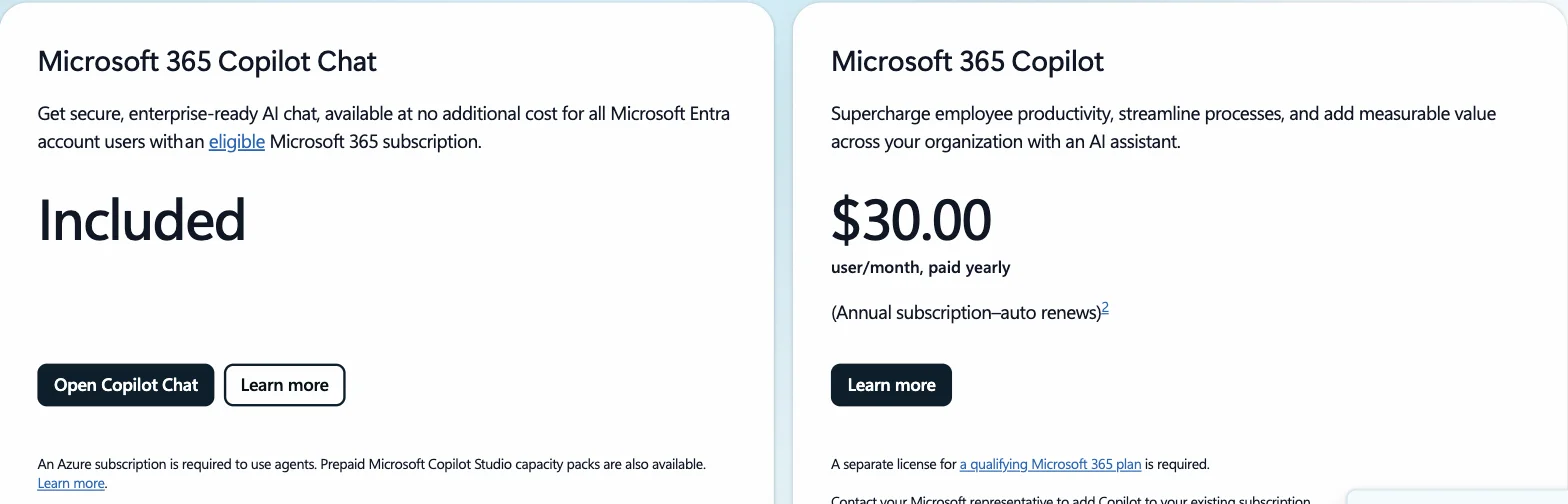
Screenshot: the live enterprise pricing tier on Microsoft's official Microsoft 365 Copilot pricing page, confirming the $30/user/month figure and the free Copilot Chat tier.
The catch: this is priced and sold as an add-on SKU, not a standalone subscription. To assign a Microsoft 365 Copilot license to a user, that user must already hold one of these qualifying base plans:
| Base plan | Approx. base cost (2026) | Total with Copilot add-on |
|---|---|---|
| Microsoft 365 E3 | ~$36/user/month (rising to ~$39 from July 2026) | ~$66-69/user/month |
| Microsoft 365 E5 | ~$57/user/month (rising to ~$60) | ~$87-90/user/month |
| Microsoft 365 Business Standard | ~$12.50/user/month | ~$42.50/user/month |
| Microsoft 365 Business Premium | ~$22/user/month | ~$52/user/month |
So when a finance stakeholder asks "what does Copilot cost," the honest answer is a range, not a single figure — $42 to $90 per user per month, depending entirely on which base tier that user already sits on. A company standardized on E5 for security and compliance reasons pays roughly double what a company on Business Standard pays for the identical Copilot add-on.
Small and midsize organizations get a separate, cheaper on-ramp: Microsoft 365 Copilot Business, capped at 300 users, is priced at $18/user/month promotionally (standard price $21) through December 31, 2026, layered on Business Standard or Business Premium.
Do you still need 300 seats to buy it?
No — and this trips up buyers working from outdated blog posts. At launch in November 2023, Microsoft required a 300-seat minimum commercial purchase, which effectively locked Copilot out of small and midsize businesses and forced larger buyers into an all-or-nothing commitment. Microsoft removed that minimum in January 2024. Organizations of any size — including a single seat — can now buy Microsoft 365 Copilot licenses directly through the admin center, which makes a small pilot group before a company-wide rollout the realistic default path rather than an exception you have to negotiate.
This matters for the ROI conversation below: with no seat floor, there is no longer a reason to buy more licenses than you can actually onboard and measure in the first 90 days.
Copilot Chat (free) vs. full Microsoft 365 Copilot (paid)
Microsoft ships two distinct products under the Copilot name inside Microsoft 365, and conflating them is the most common licensing mistake we see in rollout planning.
Microsoft 365 Copilot Chat is free and included automatically with every qualifying Microsoft 365 E3, E5, Business Standard, and Business Premium license — no add-on purchase needed. It's a GPT-based chat experience with commercial data protection (your prompts and outputs aren't used to train Microsoft's models and don't leak to the open web), but it is web-grounded only. It can reason over the open internet and over documents a user explicitly uploads or has open in Word/Excel/Outlook at that moment. It has no standing access to your organization's SharePoint sites, Teams histories, or Outlook mailboxes unless a user manually feeds that content in.
Paid Microsoft 365 Copilot ($30/user/month) is the version most rollout conversations actually mean. It adds:
- Tenant grounding — Copilot can search and reason across a user's SharePoint, OneDrive, Outlook, and Teams content through the Microsoft Graph, respecting existing permissions
- In-app Copilot inline inside Word, Excel, PowerPoint, Outlook, and Teams — not a separate chat window, but drafting, formula generation, and meeting recap built into the apps themselves
- Business Chat with tenant data — ask a question that spans multiple files and threads across the organization, not just one open document
- Copilot Studio agent-building access, covered below
The practical filter: if your use case is "help me draft this one email" or "summarize this document I have open," Copilot Chat's free tier already covers it — don't pay $30/user/month for that. If the use case is "find every mention of this client across my last six months of email and meetings," you need the paid tier's tenant grounding. See our guides to Copilot in Excel, Copilot in Word, and Copilot in Teams meeting recap for what the paid tier's in-app grounding actually looks like feature by feature.
Copilot Studio: pricing by usage, not by seat
Once a team wants to move past chat and build a custom agent — a help-desk bot, an internal knowledge lookup, a workflow trigger — that work happens in Copilot Studio, and Copilot Studio's pricing model is fundamentally different from the flat per-user Copilot license. It bills by consumption, in a unit Microsoft calls Copilot Credits (renamed from "messages" on September 1, 2025 — the pricing math didn't change, only the label).
Two ways to buy credits:
| Model | Price | Best for |
|---|---|---|
| Prepaid capacity pack | Predictable, steady agent usage | |
| Pay-as-you-go (via Azure) | ~$0.01/credit, no commitment | Spiky or unproven usage |
What burns a credit varies a lot by what the agent is actually doing:
- A classic, scripted answer: ~1 credit
- A generative AI answer: ~2 credits
- A lookup grounded in tenant data (SharePoint, Dataverse, etc.): ~10 credits
- An autonomous agent action (the agent doing something, not just answering): 25+ credits
This is why a Copilot Studio budget can't be estimated from headcount alone the way the $30/user/month license can. A help-desk agent answering 5,000 simple FAQ questions a month costs a fraction of a capacity pack; the same agent doing 5,000 autonomous ticket-routing actions can burn through several packs. If you're building your first agent, our Copilot Studio getting-started guide walks through the build process, and our guide on running loops in Copilot Studio covers the scheduled and autonomous-trigger patterns that rack up the higher-credit actions — worth reading before you commit to a capacity pack size. Note that Copilot Studio access for building agents comes bundled with the paid Microsoft 365 Copilot license, but the credits an agent consumes while running are billed separately on top.
If you're evaluating M365 Copilot specifically for automation and scheduling rather than chat, also see our breakdown of what M365 Copilot can and can't do with standing loops — chat and Agent Builder are turn-based, and anything that needs to run on a schedule has to move to Copilot Studio, which is where credit costs start accruing independently of your seat count.
Is Microsoft 365 Copilot worth it? The adoption data says: it depends
The sticker price is only half the ROI question. The other half is whether people actually use the seats you bought — and the 2026 data here is more sobering than the sales pitch.
The growth is real. Microsoft reported Microsoft 365 Copilot crossing 20 million paid enterprise seats in its April 29, 2026 earnings call, up from 15 million in January — the fastest quarterly growth Microsoft has reported since Copilot launched. Large customers are buying at real scale: Bayer, Johnson & Johnson, Mercedes-Benz, and Roche each reportedly sit above 90,000 seats, and Accenture alone signed for more than 740,000.
But utilization lags purchase. Independent surveys put weekly active usage at only 20-30% of purchased seats — meaning the number of employees genuinely relying on Copilot day to day is far smaller than the license count implies. One large-sample survey (Recon Analytics, 150,000+ U.S. respondents) put Copilot's workplace conversion rate at roughly 36%: just over a third of employees with access use it actively. IDC's 2026 licensing audit found 49% of organizations had at least 10% of their Copilot licenses completely unused. At $30-90/user/month, an unused seat isn't a rounding error — a mid-size deployment of 1,000 seats with 15% sitting idle is $54,000-$162,000 a year in pure waste, before counting anything else.
Context that matters when you frame the ROI case:
- Of Microsoft's roughly 450 million commercial Microsoft 365 seats, only about 4.4% carried a paid Copilot add-on at the 20-million-seat mark — meaning even Microsoft's best quarter ever still leaves the overwhelming majority of its own installed base unconverted. That's not a red flag by itself (most enterprise software takes years to saturate), but it argues against a "buy for everyone at once" rollout in favor of measuring adoption in the first cohort before expanding.
- Weekly engagement, once teams do adopt, reportedly sits "in the same neighborhood as Outlook" for active users, and questions per user grew roughly 20% quarter over quarter — so the ROI curve, where it forms, looks less like a one-time productivity bump and more like a habit that compounds. The gap is getting people over that first-adoption hump, not the tool's ceiling once adopted.
- License-reclamation tooling (automatically detecting and reassigning unused Copilot seats) is now a real vendor category precisely because of the waste numbers above — a signal that "buy licenses, hope for adoption" is already a known failure mode other IT teams have had to build tooling around.
The realistic framing for a buyer sizing a rollout in 2026: treat the $30/user/month add-on as a bet on a specific team's workflow, not a blanket productivity tax. Pilot with a cohort that has a concrete, recurring task Copilot demonstrably speeds up (meeting recaps, first-draft Excel formulas, email triage), measure weekly active usage against the license count at 60 and 90 days, and only scale the license count to match measured usage — not the other way around. Given there's no seat minimum anymore, there's no procurement reason to buy ahead of that data.
Frequently asked pricing and licensing questions
Does the $30/user/month price include the Microsoft 365 base plan? No. It's strictly an add-on. Confirm your base plan tier before quoting a total cost — this is the single most common budgeting mistake in Copilot rollout planning.
Can I mix paid Copilot seats and free Copilot Chat seats in the same tenant? Yes. Every eligible user gets Copilot Chat automatically; you assign the paid Microsoft 365 Copilot license only to the subset of users who need tenant grounding and in-app Copilot. This is the mechanism that makes a targeted pilot possible without a company-wide purchase.
Does Copilot Studio's per-credit cost replace the $30 seat license? No — they're layered. The $30/user/month license is what grants a user the ability to build and publish agents in Copilot Studio. The credits an agent then consumes while running are billed separately, either from a prepaid pack or pay-as-you-go.
Are there volume discounts? Microsoft negotiates enterprise agreement pricing case by case at scale (the Accenture and Bayer-scale deployments above almost certainly aren't paying list price), but there's no published public discount tier — get your Microsoft account team or a licensing partner involved for anything above a few hundred seats.
Related reading
- What is Microsoft 365 Copilot? A beginner's guide (2026) — the series hub: what Copilot is, how it works, and where it fits across the M365 apps
- Microsoft Copilot in Excel: complete guide (2026)
- Microsoft Copilot in Word: complete guide (2026)
- Microsoft Copilot in Teams meeting recap guide (2026)
- What is Copilot Studio? Build your first agent (2026)
- How to run loops in Copilot Studio
- How to run loops in Microsoft 365 Copilot (honest limits)
- Satya Nadella's ROIC app: Copilot skills, Fabric, not vibe coding
- Official: Microsoft 365 Copilot pricing · Copilot Studio pricing · Minimum requirements to deploy Microsoft 365 Copilot
Pricing, seat-minimum policy, and adoption figures in this post reflect publicly available Microsoft pricing pages and third-party reporting as of August 2026. Microsoft has changed Copilot pricing and licensing terms multiple times since 2023 launch — confirm current figures against the official pricing page above before finalizing a purchase order.