




Anyone who has asked an AI image editor for a long chain of changes knows the pattern: the first two edits look great, and by edit six the faces have shifted, the texture has gone plasticky, and the jacket you recolored is back to its original color. A new paper, MT Forcing, targets exactly that decay. It comes from SenseTime Research with HKUST MMLab, Stanford and Tsinghua AIR, and it ships code and a checkpoint. The paper is on Hugging Face, the code on GitHub, and the team runs a project page with side-by-side editing sequences.
If you follow image models, this is the editing counterpart of work we have covered on generation, such as Nano Banana 2.5 and ChatGPT Images 2.5. Those launches mostly show single edits. MT Forcing asks what happens at turn eight.
TL;DR: what readers want to know
| Question | Answer |
|---|---|
| What is it? | A training recipe for multi-turn image editing with unified multimodal models (UMMs) based on autoregressive diffusion |
| Who made it? | Houyuan Chen, Fanzhou Wang, Xiangyu Fan and colleagues; SenseTime Research, HKUST MMLab, Stanford, Tsinghua AIR |
| Base model tested | SenseNova-U1.5 (the project page also lets you pick SenseNova-U1) |
| Headline claim | Over 100 eight-turn sessions, pixel drift falls from 6.34 px to 0.74 px; content consistency rises from 7.09 to 8.40 out of 10 |
| Is it open? | Inference code on GitHub; checkpoint on Hugging Face tagged Apache-2.0 |
| Hardware | An NVIDIA CUDA GPU; Python 3.11.13 |
| Main caveat | Benchmark and metrics come from the same team |
Why does multi-turn editing drift?
When you edit an image once, the model sees a clean source and produces one output. When you edit repeatedly, the model's input at turn five is its own output from turn four, with whatever small errors that carried. Those errors compound: textures degrade, artifacts accumulate, and regions that should have stayed fixed slowly change. The authors name two symptoms in the abstract: unstable visual quality, and inconsistent content, meaning unintended changes to preserved regions and to prior edits.
This is a training-distribution problem. Most editing models are trained on single-turn pairs: one source image, one instruction, one target. At inference they get fed their own imperfect outputs, a situation they never saw in training. Language-model people will recognize this as exposure bias, and the "forcing" in the name nods to teacher forcing. Our explainer on how diffusion image generation works covers the underlying sampling process if you want the background.
How does MT Forcing work?
The method has two parts, both described in the paper abstract and the project page.
Single-Turn DMD (distribution matching distillation). The student model edits its own generated history one turn at a time. A frozen teacher starts from the original image and applies the accumulated instructions in one single pass. Because the teacher never chains edits, it provides quality guidance that does not carry errors forward. In the authors' words, it supervises the student's self-rollouts "without recursive error accumulation".
Teacher-Forcing Guidance. Single-turn matching alone cannot guarantee that turn six remembers what turn two did, so the second part supervises history-dependent transitions on reference trajectories. It is used during warmup and then as a regularizer during distillation, encouraging cross-turn content consistency beyond what per-turn distribution matching can ensure.
The combined effect, as the project page puts it, is to carry single-turn editing quality into multi-turn creation. The team also introduced a dataset and benchmark, MTEdit and MTEdit-Bench, in a companion paper, which the repo asks users to cite alongside this one.
What do the reported numbers say?
The project page reports results across 100 eight-turn sessions in MTEdit-Bench for SenseNova-U1.5, eight-turn means weighting all turns equally:
| Metric | Base SenseNova-U1.5 | With MT Forcing |
|---|---|---|
| Instruction following (IF, out of 10, higher is better) | 8.47 | 9.66 |
| Content consistency (CC, out of 10, higher is better) | 7.09 | 8.40 |
| Drift resistance (DRS, out of 5, higher is better) | 3.83 | 4.30 |
| Matched-point displacement (lower is better) | 6.34 px | 0.74 px |
On the default content-consistency chart, the page highlights turn 8 specifically: 7.68 for MT Forcing versus 3.22 for the base model, a gap of 4.46 points. That shape is the point of the paper: a base editor may look fine at turn one and fall apart later, while the trained model degrades far more slowly.
Two details matter for reading these numbers. First, the page says IF and CC follow the benchmark's failure-triggered scoring rule, so turns after a failure receive zero; that makes late-turn scores sensitive to a single early mistake. Second, the authors themselves say to interpret each metric separately. The pixel metric measures mean displacement between matched points, so it captures spatial alignment, not whether the edit looked good.
What does it look like in practice?
The project page includes a beach-wedding sequence with eight edits, adding formalwear, flowers, lanterns and sunset light. Here is the base model at turn 8, where the last instruction asks to restore champagne-gold embroidery on the sleeves, shoulder lace and side panels:
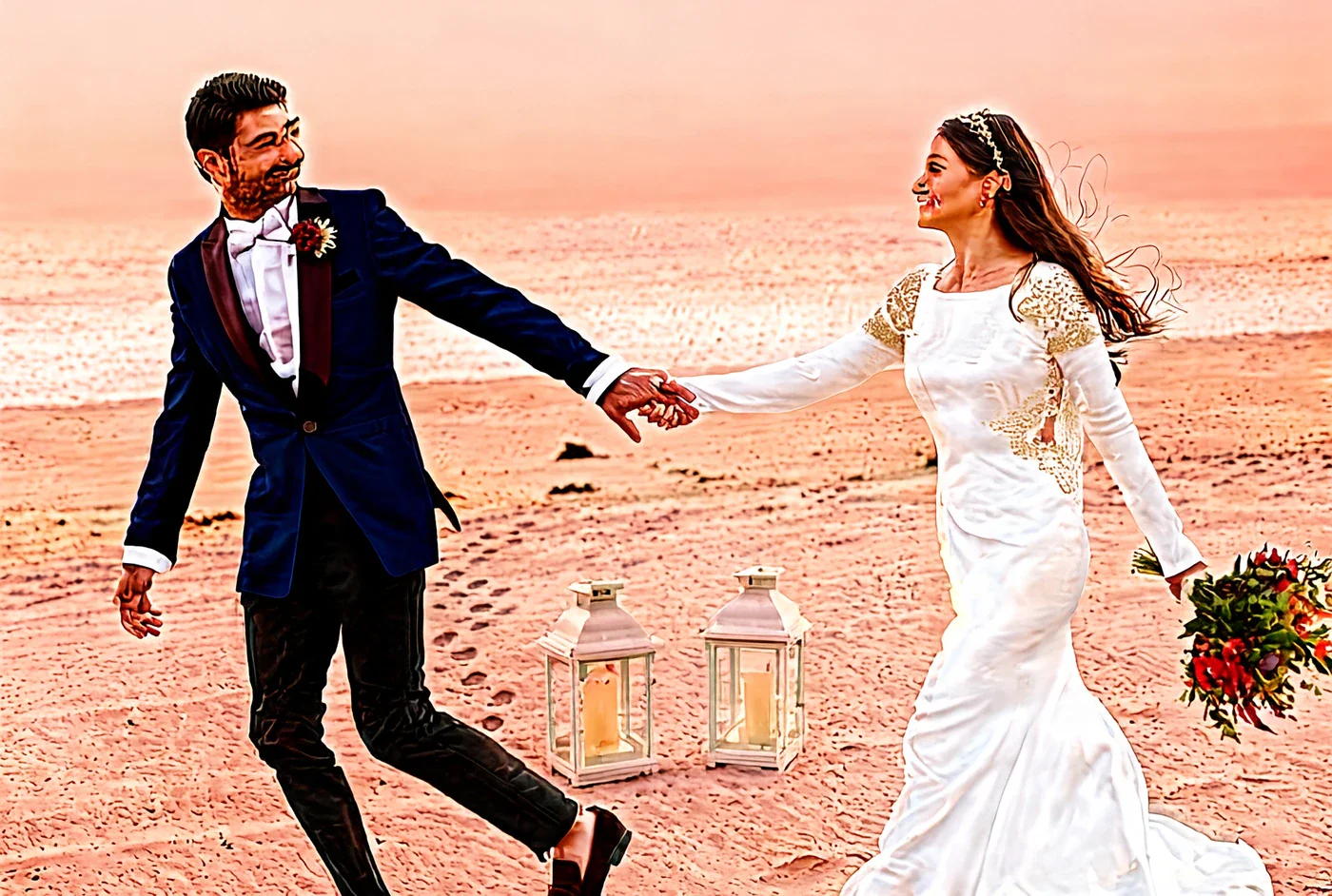 Multi-turn image editing result for the base SenseNova-U1.5 model at turn 8 of a beach wedding sequence
Image: MT Forcing authors (SenseTime Research)
Multi-turn image editing result for the base SenseNova-U1.5 model at turn 8 of a beach wedding sequence
Image: MT Forcing authors (SenseTime Research)
The base output shows the harsh outlines, oversaturated color and smeared skin that accumulated drift tends to produce. And here is the MT Forcing result for the same turn:
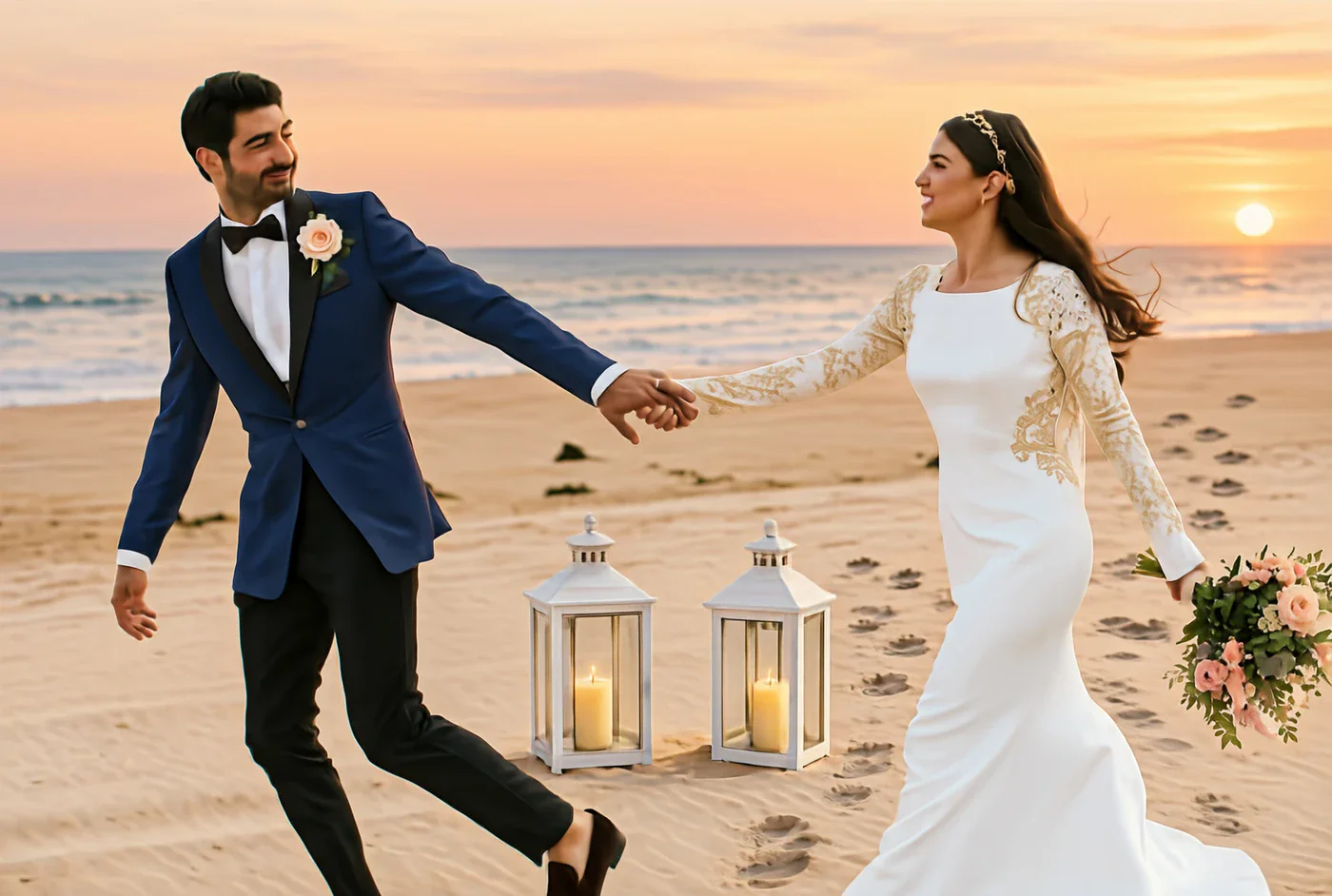 MT Forcing multi-turn image editing result at turn 8 of the same beach wedding sequence
Image: MT Forcing authors (SenseTime Research)
MT Forcing multi-turn image editing result at turn 8 of the same beach wedding sequence
Image: MT Forcing authors (SenseTime Research)
These are curated examples chosen by the authors, so they show the best case rather than the average. The project page also advertises a fifteen-turn comparison with a kitten, which goes beyond the eight turns used for the benchmark averages.
How do you run it?
The README documents inference. According to it, you need Python 3.11.13 and an NVIDIA CUDA GPU, then:
uv sync --locked
source .venv/bin/activate
export SENSEUMM_ATTENTION_BACKEND=torch
You then export a configuration pointing to the checkpoint, the architecture resources and the saved extended tokenizer using python -m inference.prepare, and describe your edits in a small JSON request:
{
  "image": "input.jpg",
  "prompts": [
    "Change the mug to blue. Keep everything else unchanged.",
    "Add white stripes to the blue mug. Keep the composition unchanged."
  ]
}
python -m inference.run --config configs/local_demo.yaml --request examples/edit.json then writes each round to outputs/demo/round_000/, round_001/ and so on.
Several practical notes come from the checkpoint documentation:
- Use the saved extended tokenizer, not an unmodified Qwen tokenizer.
- History is kept in persistent KV caches. Each turn continues from the generated history, and exported JPEGs are not fed back as conditioning inputs, so compression does not add its own drift.
- History can be bounded.
inference.history_window.max_imagesset to a positive integer caps image context, andkeep_initial_image=truekeeps the source image when the cache is rebuilt. - Attention backend. The default needs a Hopper-compatible FlashAttention 3 build; the README recommends PyTorch SDPA instead, and says FlashAttention 2 is not a substitute.
- Sampling. The example config uses an eight-step Euler solver and 1080p pixel budgets, with image dimensions following the source aspect ratio.
The README is aimed at inference. We did not see training scripts described in it, so reproducing the distillation recipe from scratch is not a one-command job as of this writing.
Where does this fit among image editors?
Commercial editors keep adding multi-step features, from Google's Pics in Workspace to Krea's fast editing model, and open options like Qwen-Image 2.1 Turbo keep improving. What is distinctive about MT Forcing is that it is a training method evaluated on sustained editing, not a new general-purpose model, and it ships with a benchmark designed around that failure mode. None of the papers or pages we read compare it head to head with closed editors such as Nano Banana or GPT Image, so we cannot rank it against them.
 A green brush fills a leaf-shaped gap in a small cream picture tile, illustrating repeated image edits
Limits and open questions
- Self-made benchmark. MTEdit-Bench comes from the same team, and we have not independently audited how its instruction-following and consistency scores are produced.
- One base family. The reported results are for SenseNova models. Whether the recipe transfers to other unified multimodal models is untested in what we read.
- Cherry-picked demos. The qualitative sequences are chosen by the authors.
- Small community signal. At the time of writing the GitHub repo had only a handful of stars and the checkpoint had no downloads yet, so there is little third-party testing.
- Resources section. The project page still marks some official links as coming soon.
Why it matters for people who edit with AI
Most real creative work is iterative: you tweak, look, tweak again. A model that scores well on a single edit but decays over a session pushes users toward the worst workflow, which is regenerating from scratch. A method that keeps earlier edits intact would change how people use these tools, and it is a cheap trick to check on your own images now that the checkpoint is public. Run a five-turn chain on your own photo with the base and tuned models, and compare the last frame with your starting image. That, more than any benchmark, tells you whether drift is solved for your use case.
Related reading
- How diffusion image generation works
- Google DeepMind Nano Banana 2.5
- ChatGPT Images 2.5 launch
- Google Pics: AI image editing in Workspace
- Krea 3 image editing model
- Qwen-Image 2.1 Turbo: how to run
- Primary sources: paper, arXiv, GitHub, checkpoint
Numbers and repository details are accurate as of October 20, 2026, and come from the authors' own materials.