



Amazon Web Services put Kimi K3.1 Pro Highspeed from Moonshot AI on Amazon Bedrock on November 10, 2026. You reach it through cross-Region inference profiles, the same OpenAI-compatible Chat Completions path AWS already documents for Kimi K3, plus Converse, Responses, explicit prompt caching, a half-price Flex tier, and a first-party OpenCode wiring guide.
For teams that already run agents on Bedrock, the practical change is a model ID swap and a chance to test Moonshot’s post-trained K3.1 line without sending traffic to Moonshot’s own API. For teams that evaluated Kimi only on the Kimi API, Bedrock is the procurement path: IAM, regional profiles, and AWS’s statement that inference data stays inside the AWS boundary and is not used to train the model.
TL;DR
| Item | Detail |
|---|---|
| Announced | November 10, 2026 (AWS ML blog) |
| Variant on Bedrock | Kimi K3.1 Pro Highspeed (faster output token rate) |
| Recommended model ID | global.moonshotai.kimi-k3.1 |
| Residency profiles | us.moonshotai.kimi-k3.1, in.moonshotai.kimi-k3.1 |
| Context | 1M tokens (same class as K3 per AWS/Moonshot) |
| APIs | OpenAI Chat Completions (recommended), Responses, Bedrock Converse and Invoke |
| Reasoning | Always on; reasoning_effort or reasoning.effort: low, high, max (default max) |
| Cost levers | Flex tier (half Standard price), explicit prompt caching |
| Agent IDE | Official OpenCode opencode.json example in the AWS post |
What Kimi K3.1 Pro Highspeed is
Moonshot released Kimi K3.1 Pro in October 2026 as the first model in its K3.1 series. explainx.ai covered the launch benchmarks, API price, and the November 4 open-weight drop in the Kimi K3.1 Pro overview and the earlier Kimi K3 open-weights explainer.
AWS’s November post positions Highspeed as the Bedrock serving SKU: same endpoint family as Kimi K3 on Bedrock, but Moonshot reports two to three times the output speed of Kimi K3.1 Pro on Moonshot’s side. That matters for coding agents, which chain many short generations. Each tool-call loop waits on output tokens; a faster stream shortens edit-test-fix cycles.
Moonshot’s own blog claims gains in long-horizon agentic work, fewer factual errors, financial modeling, office documents, and coding for game engines, 3D scenes, and CAD scripts. Those are vendor statements. Independent scores such as the Artificial Analysis line in our launch post are useful, but Bedrock adoption is really a hosting and governance decision.
Why Bedrock instead of the Kimi API
Three reasons enterprises cite when a frontier open-weight model lands on a hyperscaler:
- Contract and IAM. The model rides an existing AWS agreement. Security reviews that already approved Bedrock do not restart for Moonshot’s corporate entity.
- Data boundary language. AWS states that your data is processed within the AWS data boundary, is not shared with Moonshot AI, and is not used to train the model. It also lists zero data retention for inference and zero operator access during inference. Read the Bedrock service terms for your account type; this post does not restate legal guarantees.
- Model mixing. Bedrock already hosts other coding-oriented models. Our GLM 5.3 on Bedrock guide shows the same OpenAI-client pattern. You can A/B Kimi K3.1 against GLM or Claude family models behind one billing relationship.
Moonshot still operates the Kimi API at roughly $2/$10 per million tokens for direct access and open-weight self-hosting. Bedrock pricing is on Amazon Bedrock pricing and may differ by tier and cache hits. Compare total cost per successful agent task, not list price alone.
For agent security context on Kimi-class models, see Vals AI’s cyber-offense bench, which scored Kimi K3.1 Pro in a controlled range, and Moonshot’s own cyber ablation in the launch post.
Model IDs and regions
AWS exposes Kimi K3.1 Pro Highspeed only through cross-Region inference profiles:
| Profile ID | Routing | When to use |
|---|---|---|
global.moonshotai.kimi-k3.1 | Any supported commercial AWS Region | Default; lower per-token cost per AWS |
us.moonshotai.kimi-k3.1 | US Regions only | US data residency |
in.moonshotai.kimi-k3.1 | India Regions only | India residency |
If you already call Kimi K3 on Bedrock, AWS says you can change the model ID in existing code. Regional availability and card details are on AWS’s model documentation linked from the announcement.
Calling Kimi with the OpenAI SDK
AWS recommends the OpenAI-compatible Chat Completions endpoint on bedrock-runtime. You authenticate with a short-lived bearer token from AWS credentials via aws-bedrock-token-generator, not a long-lived OpenAI key.
from openai import OpenAI
from aws_bedrock_token_generator import provide_token

REGION = "us-west-2"
MODEL_ID = "global.moonshotai.kimi-k3.1"

client = OpenAI(
    base_url=f"https://bedrock-runtime.{REGION}.amazonaws.com/openai/v1",
    api_key=provide_token(region=REGION),
)

completion = client.chat.completions.create(
    model=MODEL_ID,
    messages=[
        {"role": "system", "content": "You are a concise senior engineer."},
        {"role": "user", "content": "When should I prefer a queue over a stream?"},
    ],
    reasoning_effort="high",
)
print(completion.choices[0].message.content)
Reasoning effort: Kimi K3.1 Pro Highspeed always reasons before answering. reasoning_effort accepts low, high, or max. If you omit it, the model uses max, which increases latency and output tokens. For routing inside an agent, use low on classification steps and high or max on codegen.
The Responses API uses the same client with reasoning={"effort": "low"} instead. The Converse API uses boto3 with modelId="global.moonshotai.kimi-k3.1" and may return a reasoning block before text; pick the text block from the content array as AWS’s sample shows.
Prerequisites from AWS: Python 3.11+, openai, aws-bedrock-token-generator, boto3, and IAM permission for bedrock:InvokeModel and streaming, plus bedrock:CallWithBearerToken when using bearer tokens.
Flex tier: half price, slower tail
Bedrock’s Flex tier serves Kimi at half the Standard on-demand price with potentially longer response times. AWS suggests batch evals, summarization, and background agent steps.
On Chat Completions, pass service_tier="flex". On Converse, set serviceTier to {"type": "flex"}. Standard, Priority, and Flex draw from the same on-demand quota. AWS recommends starting with a small Flex share and watching CloudWatch dimensions ServiceTier and ResolvedServiceTier before shifting traffic.
This mirrors the tier story on GLM 5.3 Bedrock and the broader Bedrock tokenomics patterns we covered for finops teams.
Explicit prompt caching for agents
Agents resend large stable prefixes: system prompts, tool schemas, repo guidelines, and reference docs. Kimi K3.1 Pro Highspeed supports automatic prefix caching and explicit breakpoints on Chat Completions, Responses, and Invoke.
Rules from AWS:
- Explicit caching does not work on Converse.
- A
prompt_cache_breakpointmust follow at least 256 tokens of stable content. - Cached content is retained at least 30 minutes.
- Cache writes bill higher than standard input; reads bill at a discount and do not count toward input TPM quota.
The AWS post shows a Responses example that marks breakpoints on a long repo_guidelines.md system prompt and on the user turn, then prints cached_tokens from usage.input_tokens_details. That pattern is the same class of savings we described for prompt caching on Bedrock with GPT-6 Astra patterns.
For multi-turn tool use on the open weights, Moonshot’s model card notes you must pass back the full assistant message including reasoning_content. Bedrock callers should confirm the same requirement in their harness when migrating from the Kimi API.
OpenCode on Bedrock
AWS documents a terminal coding agent path with OpenCode and the Bedrock Chat Completions provider. You point baseURL at https://bedrock-runtime.us-west-2.amazonaws.com/openai/v1 (swap Region), register global.moonshotai.kimi-k3.1 with reasoning capabilities, and set it as the default model. Short-lived Bedrock API keys from the console are recommended for production; long-term keys are for exploration.
OpenCode connect and reasoning variants
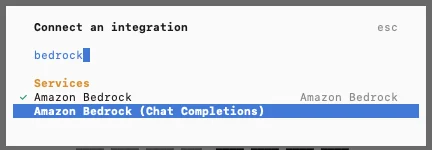 OpenCode connect dialog for Kimi K3.1 Pro Highspeed on Amazon Bedrock Chat Completions
Image: Amazon Web Services
After /connect and key paste, OpenCode stores credentials once per key. Use /models to switch between Kimi and other providers mid-session.
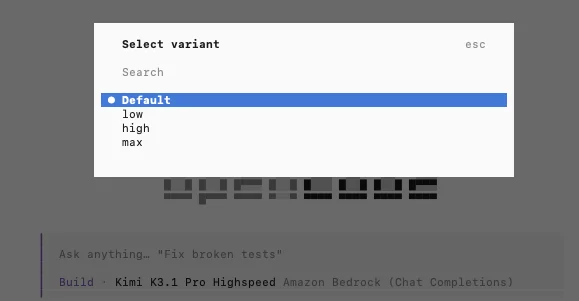 Reasoning effort variants for Kimi K3.1 Pro Highspeed in OpenCode on Bedrock
Image: Amazon Web Services
The capabilities block lists supported reasoning efforts so OpenCode exposes low, high, and max variants. That UI matters when you want a fast refactor pass on low and a careful migration on max without editing config between tasks.
OpenCode is one of several harnesses in our agent harness comparisons. Bedrock is not the only backend: Moonshot’s own Kimi Code product and third-party hosts remain options.
Comparison snapshot (where to look elsewhere)
| Need | Consider |
|---|---|
| Lowest friction if you already pay Moonshot | Kimi API direct (pricing page) |
| AWS-only procurement and residency profiles | Bedrock Kimi K3.1 Highspeed (this announcement) |
| Self-host with open weights | Hugging Face moonshotai/Kimi-K3.1-Pro plus vLLM/SGLang |
| Another open-weight coder on the same bill | GLM 5.3 on Bedrock |
| Cyber eval context | Vals cyber-offense bench |
AWS does not publish a side-by-side Bedrock bench table in this post. Run your own tasks on your repositories before switching production traffic.
What to verify in your account
- Entitlement. New Bedrock models sometimes roll out in waves. Confirm Kimi K3.1 appears in the console Playground and in
ListFoundationModelsfor your Region. - Reasoning defaults. Leaving effort at default
maxcan balloon cost on simple steps. Set effort per call type in your router. - Cache economics. Measure cache hit rate before assuming savings; cache writes cost more upfront.
- License if you later self-host. Moonshot’s open license includes revenue gates for large Model-as-a-Service operators, separate from Bedrock terms (details in our weights update).
- Speed claims. The 2–3× speed statement is Moonshot’s comparison to Kimi K3.1 Pro on Moonshot infrastructure, not a guarantee against other Bedrock models.
Bedrock console quick start
If you are not ready to wire Python yet, AWS’s path is: open the Amazon Bedrock console, choose Test, then Playground, and select Kimi K3.1 from the model picker. That is the fastest way to sanity-check entitlement and reasoning defaults before you paste IAM policies into CI. When the playground works, copy the same model ID into your agent router and enable streaming so tool-calling harnesses see tokens as they arrive. Teams that standardize on Amazon Bedrock AgentCore evaluation patterns can add Kimi as another model arm in the same eval harness once the ID is approved.