




Firecrawl open-sourced pdf-inspector — a Rust PDF engine that classifies documents in ~20ms and extracts clean Markdown locally so agents do not wait on OCR for every file.
CTO Nicolas Camara’s framing: process PDFs without defaulting to a 2–10 second OCR hop. Firecrawl says the same engine powers /parse with their custom OCR models — classify first, OCR only when needed. On X they also quote ~0.002s per page.
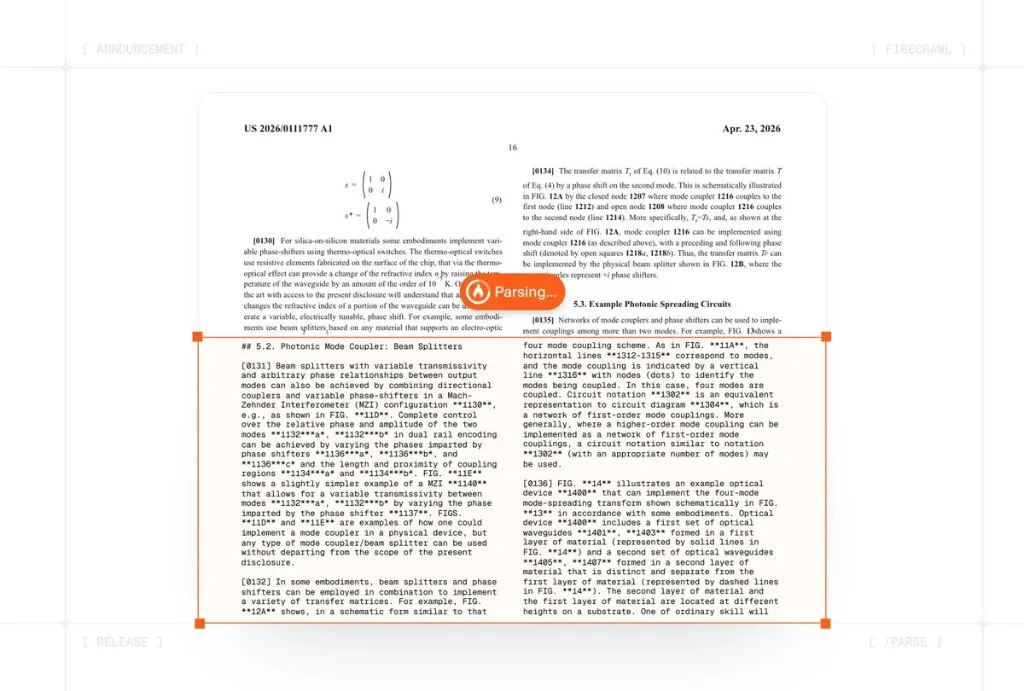 Firecrawl pdf-inspector turning a dense patent PDF into structured Markdown while a Parsing bar advances
Firecrawl announcement creative: native PDF layout → structured Markdown via /parse.
TL;DR — what people are asking
| Question | Direct answer |
|---|---|
| What is it? | Open-source Rust PDF classifier + Markdown extractor (no OCR in-core) |
| Who built it? | Firecrawl (lead shoutout to Abimael Martell) |
| Speed claims? | ~20ms classify · ~0.002s/page · 200 PDFs in 2.8s (vendor post) |
| Bench (local, OCR off)? | Overall 0.875 on opendataloader-bench 200-doc set; 0.470s corpus time |
| License? | MIT |
| Bindings? | Rust · Python · Node · WASM · pdf2md / detect-pdf CLI |
| vs OCR? | Complements OCR — route text PDFs locally, OCR only scanned pages |
| Best for? | Reports, papers, invoices, legal, financial native-text PDFs |
Why agents needed this
Most RAG and agent stacks treat “PDF” as “run OCR.” That is wrong for the majority of business documents that already embed text operators. Firecrawl’s README cites roughly ~54% of PDFs as not needing OCR — expensive if you still ship every page through a vision/OCR service.
pdf-inspector’s job:
PDF arrives
  → classify (~10–50ms)
  → TextBased + high confidence?
      YES → extract Markdown locally (~sub-second for typical docs)
      NO  → send pages_needing_ocr to OCR (2–10s)
That routing is the product insight. Speed is the demo; skipping OCR is the cost and privacy win — contracts and medical PDFs never leave your box for the text path.
What shipped
From the public repo (MIT):
- Smart classification —
TextBased/Scanned/ImageBased/Mixed, confidence 0–1, per-page OCR hints - Position-aware extraction — fonts, X/Y, multi-column reading order, RTL
- Markdown conversion — H1–H4 via font tiers, lists, code (monospace), bold/italic, URLs, page breaks
- Tables — rectangle-based drawing ops + alignment heuristics (financial tables called out)
- CID / ToUnicode — Type0 / Identity-H and common encodings
- Encoding issue flags — so callers can fall back to OCR when fonts are broken
- Single document load — detect + extract share one parse
- No ML in the core — pure Rust on
lopdf; no model weights required for the text path
Firecrawl’s hosted /parse pairs this with their OCR models for the pages that fail the text path.
Benchmark numbers (treat carefully)
Vendor-published local comparison on opendataloader-bench (200 PDFs), OCR disabled, Apple M4 Pro, refreshed July 31, 2026:
| Engine | Overall | Reading order | Tables (TEDS) | Headings | Speed (200 docs) |
|---|---|---|---|---|---|
| pdf-inspector | 0.875 | 0.915 | 0.814 | 0.788 | 0.470s |
| liteparse | 0.873 | 0.913 | 0.693 | 0.811 | 0.750s |
| opendataloader | 0.831 | 0.902 | 0.489 | 0.739 | 2.569s |
| pymupdf4llm | 0.735 | 0.886 | 0.401 | 0.424 | 17.117s |
| markitdown | 0.589 | 0.844 | 0.273 | 0.000 | 16.165s |
Scores are 0–1. Engine versions and the reproducible results branch are documented in the repo. This is a native-text, local-engine bake-off — not a claim that pdf-inspector beats vision OCR on scans.
Camara’s social claim of 200 PDFs in 2.8s is a separate throughput anecdote; use the table above for apples-to-apples corpus timing.
Quick start
Node
npm install @firecrawl/pdf-inspector
import { readFileSync } from 'fs';
import { processPdf, classifyPdf } from '@firecrawl/pdf-inspector';

const buf = readFileSync('document.pdf');
const type = classifyPdf(buf);
const result = processPdf(buf);
console.log(result.pdfType);  // TextBased | Scanned | ImageBased | Mixed
console.log(result.markdown);
CLI
cargo install pdf-inspector
pdf2md document.pdf
pdf2md document.pdf --json
detect-pdf document.pdf --analyze --json
Python / Rust / WASM
# Rust
cargo add pdf-inspector

# Browser
npm install @firecrawl/pdf-inspector-wasm
Python installs via maturin from source (see repo docs/python.md) or current PyPI packaging as published.
Classification strategies
| Strategy | Behavior | Use when |
|---|---|---|
| EarlyExit (default) | Stop on first non-text page | Fast path for pure text PDFs |
| Full | Scan all pages | Accurate Mixed vs Scanned |
| Sample(n) | Evenly spaced pages | Huge PDFs, speed > precision |
| Pages(vec) | Explicit page list | Caller already knows hot pages |
Output includes pages_needing_ocr so you OCR page 7 and 12, not the whole 80-page deck.
How it compares (practically)
| Need | Reach for |
|---|---|
| Native-text PDF → Markdown, local, fast | pdf-inspector |
| Scanned / photo PDF, bounding boxes, 170 languages | Mistral OCR 4 or similar OCR APIs |
| Heavy layout / academic parsing with models | MinerU-class pipelines |
| Web pages → Markdown for agents | Firecrawl scrape / Agent API |
pdf-inspector is not “better than Mistral OCR” in the same sport. OCR reads pixels. pdf-inspector reads PDF operators. The winning architecture is both, with a 20ms referee.
What the replies got right
- Sensitive docs stay local on the text path — real privacy win.
- Classify-then-OCR cuts spend; a 20ms check can delete a multi-second call.
- Scanned-under-text traps — users already report false “no OCR needed” when a few characters sit atop a scan. Trust confidence + spot-check Mixed pages.
- Diagrams / pure images — still OCR or multimodal. Tables-from-vectors are in-scope; charts-as-bitmaps are not.
- Self-host scale — the library is local; your queue, disk, and batching still matter. Speed claims ≠ distributed OCR fleet.
Agent wiring pattern
for each pdf in inbox:
  meta = classify(pdf)
  if meta.type == TextBased and meta.confidence >= threshold:
      md = extract_markdown(pdf)
  else:
      md = ocr_service(pdf, pages=meta.pages_needing_ocr)
  chunk(md) → embed → retrieve → agent
Pin thresholds per corpus. Financial filings and patents (like Firecrawl’s demo creative) are often text-rich. Phone scans of contracts are not.
Production checklist
Before you swap MarkItDown-style defaults for pdf-inspector:
- Sample 100 real PDFs from production — measure TextBased vs Scanned rates.
- Diff Markdown against your current parser on the text subset — tables and reading order first.
- Wire OCR fallback with
pages_needing_ocr— never silent-empty on Mixed. - Log confidence — alert when TextBased confidence is low but you skipped OCR.
- Pin crate/npm version — layout heuristics will evolve; lock for eval stability.
- Privacy review — confirm scanned path still meets your DPA if OCR is cloud-hosted.
Teams that only celebrate the 0.470s bench and skip step 3 will rediscover why OCR existed.
When not to use it alone
- Phone-camera PDFs of paper contracts
- Fax-style grayscale scans
- Slide decks that are mostly embedded screenshots
- Handwriting forms
- Documents where you need pixel-accurate bounding boxes for redaction UI (Mistral OCR 4 territory)
Use pdf-inspector as the gate, not the only tool in your document stack.
How Firecrawl fits
Firecrawl already owns “URL → clean Markdown” for the live web (our Firecrawl agent guide). pdf-inspector is the offline sibling: file → clean Markdown with the same agent-friendly output shape. Hosted /parse stitches classification + OCR so API users get one call; open-source pdf-inspector lets you own the fast path.
If you self-host agents that ingest both URLs and PDFs, standardize on Markdown chunks from both sides — fewer prompt templates, fewer chunking bugs.
Limitations to budget for
- Broken font encodings → flagged, but you still need an OCR fallback
- Complex vector art / equations may need specialized parsers
- Headline “0.002s/page” varies by CPU, page complexity, and I/O
- WASM in-browser is powerful for privacy UX; large PDFs still need memory headroom
- Hosted
/parsequality depends on Firecrawl’s OCR side for scan pages — measure that separately - A few characters overlaid on a scanned page can fool “text present” heuristics — spot-check Mixed docs
- Perfect Markdown still needs good chunking before RAG; pair with normal eval habits
Bottom line
pdf-inspector is Firecrawl open-sourcing the fast path of document agents: detect text PDFs in tens of milliseconds, emit Markdown locally, call OCR only when the page is actually an image.
If your pipeline still OCRs every upload, this is the missing if statement. Clone firecrawl/pdf-inspector, run detect-pdf on your corpus, and count how many files never needed a vision model. Then wire OCR for the rest — and stop paying vision prices for digital text that was already sitting in the file.
Validate the extracted document before trusting retrieval
A fast extraction can still preserve the wrong reading order. Build a review sample with a two-column article, a table containing negative numbers, a scanned page with a small native-text header, and a diagram whose labels matter. Compare the Markdown with the rendered pages. Check whether column boundaries, captions, footnotes, and table headers remain attached to the right text. A file classified as text-based is not a certificate that every meaningful element was extracted.
Keep page references with the text passed into your retrieval system. When an agent answers from a financial table, a reviewer should be able to open the original page and check the row, units, and period. Plain Markdown without provenance can make a clean-looking answer harder to verify than the source PDF. Where extraction loses critical layout, retain an image or route the affected page to a more suitable parser instead of silently flattening it.
Also test the fallback as part of the complete pipeline. An OCR request may fail, time out, or return incomplete text. Record those outcomes explicitly and keep the document out of the searchable index until the required pages are available. Otherwise the agent may interpret missing evidence as an absence of relevant information. Distinguish a document that was fully processed from one where only the native-text pages succeeded.
The library's repository describes its supported APIs and classification behavior. Use its current examples for the installed version, then measure your own corpus. Vendor timing is useful context; your acceptance gate should combine correct extraction, recoverable failures, and end-to-end latency on the files your users actually submit.
Related on explainx.ai
- Firecrawl web scraping API for AI agents
- Firecrawl relaunches free keyless search and scrape for agents (Aug 2026)
- Mistral OCR 4 — bounding boxes & document AI
- Cohere Parse 5 — $1.50/1k pages, ParseBench 79.2
- MinerU 3.4 — document parsing for RAG agents
- Baidu Unlimited-OCR / long-horizon parsing
- PixelRAG — visual RAG from screenshots
- CocoIndex — incremental agent data engine
- What is MCP?
- Agent skills directory
Primary sources: GitHub — firecrawl/pdf-inspector · Firecrawl / Nicolas Camara posts (Aug 1–2, 2026) · repo README benchmark table (opendataloader-bench, July 31, 2026)
Speed and quality figures reflect Firecrawl’s public posts and README as of August 3, 2026. Re-run benches on your hardware and corpus. pdf-inspector does not replace OCR for scanned pages — it routes around OCR when text is already in the file. Follow @explainx_ai for document-agent updates.