



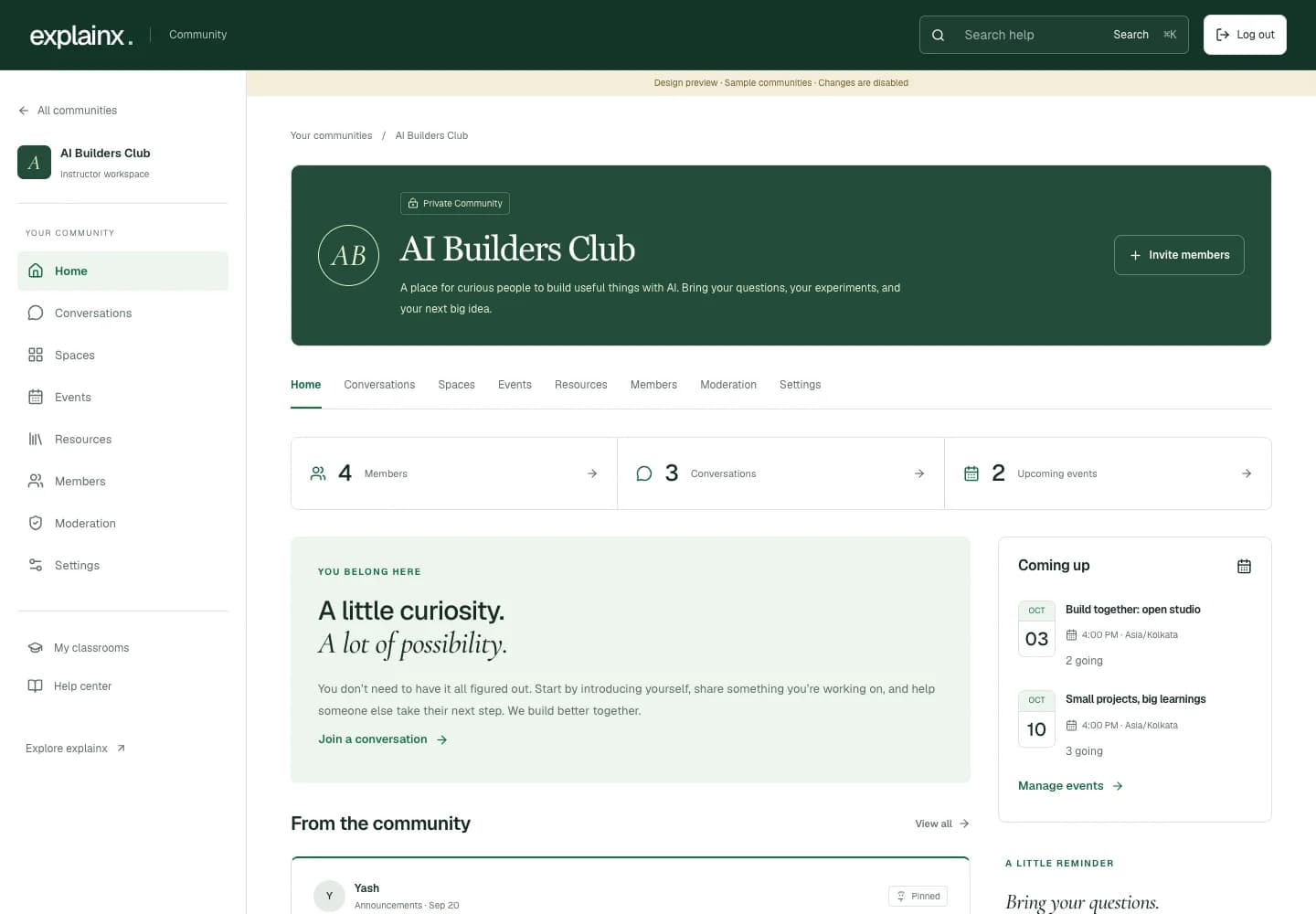
A good workshop leaves people with more than a recording. They have questions they could not quite phrase during the session, a project they want feedback on, and a reason to keep learning with the people they met.
The new explainx.ai community workspace gives those conversations a home. For someone becoming an AI instructor, it brings the everyday work of running a learning community into one place: welcoming people, organizing discussions, sharing resources, and making time to meet again.
Release status: preview. This walkthrough shows the implemented redesign using sample communities. Release verification is still in progress; these screenshots are not evidence that the new workspace is available to every account today.
What changes for instructors and learners?
| Question | How the new workspace handles it |
|---|---|
| Where do I begin? | Your communities home shows the communities you manage and the ones you belong to. |
| What does a new community start with? | A private home, a welcome message, and three starter spaces for announcements, introductions, and questions. |
| How do I bring people in? | Publish a discoverable profile with free joining, approval requests, or paid membership; use invitation links for private communities and staff. |
| Can another instructor help? | The owner can appoint community instructors and moderators after they join. |
| Where do useful materials go? | A shared resource library keeps guides, recordings, and course links together. |
| How do we meet? | Schedule an event with a time, a meeting link, and member RSVPs. |
| What happens to workshop classrooms? | They retain their separate enrollment rules and remain accessible through My classrooms. |
Why organize around a community instead of a feed?
A feed is useful when you already know what you are looking at. It is less helpful when your first questions are: Who is this for? Where should I introduce myself? Where is the recording? Can I ask an instructor for help?
The workspace starts with that context. Each community has a name, a purpose, a welcome message, and consistent navigation. Conversations live alongside events, resources, and the people taking part.
That is the practical side of social learning for AI: make it easier for people to ask, explain, try something, and return with what they learned. The interface cannot create that culture on its own. It can make the next useful action easier to find.
What does an instructor see after creating a community?
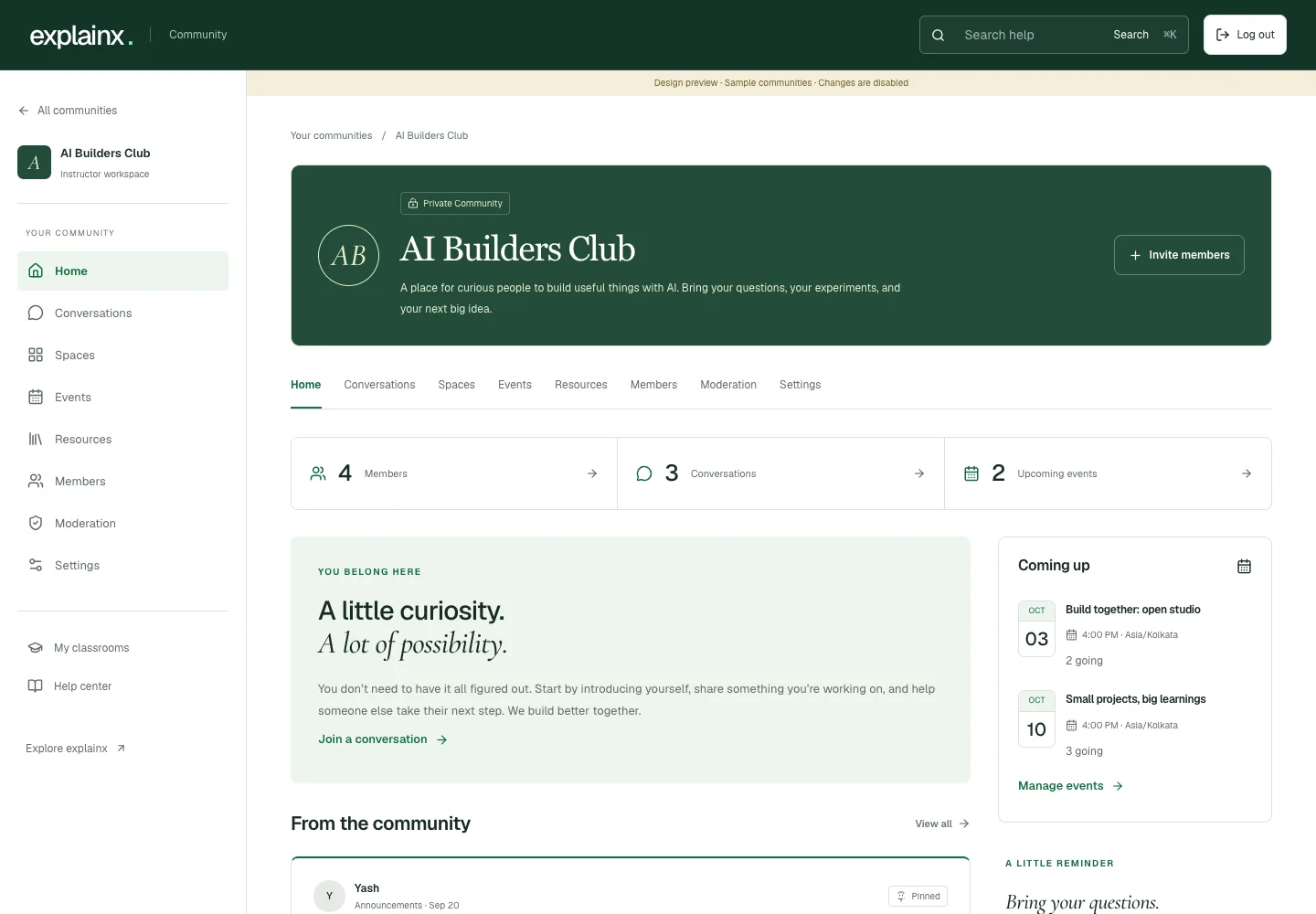
The redesigned workspace, captured from a local design preview with sample members and conversations.
Creating a community asks for a name, a short purpose, an optional welcome message, and a color. The owner then lands in the workspace with three ready-to-use spaces:
- Announcements: posts from the owner and instructors.
- Introductions: a place for learners to say hello.
- Questions & ideas: a shared discussion space.
A launch checklist points to three concrete next steps: write a welcome message, invite people, and start a conversation. An empty community should help you begin without presenting a wall of administrative settings.
For an AI Maker Bootcamp style group, that first conversation might be a project introduction. For a focused workshop, it might be a question about the task each learner wants to improve.
How should you set up your first learning spaces?
Start with the three defaults. Add another space when there is a recurring conversation that deserves its own home, such as project feedback or weekly practice.
There are two posting modes. Discussion spaces allow members to start posts. Announcement spaces reserve new posts for the owner and instructors, while members can reply to an open conversation. Spaces can be renamed, described, and archived when their work is done.
A useful welcome post can be simple:
Welcome to the community.

Tell us what you do, one task you would like to improve with AI,
and one thing you have already tried. If you are stuck, describe
what happened and what you expected instead.

Start in Introductions. Bring project questions to Questions & ideas.
Our next office-hours session will appear in Events.
The goal is to help people contribute something specific. It is the same principle behind team AI upskilling that produces useful work: connect learning to a task, give people a way to ask for feedback, and make the next attempt visible.
Can people discover a community before joining?
Yes. Owners can publish a profile in Discover communities. Each published community has a permanent public address, a host name, an introduction, and a clear joining option. Visitors can search the directory and filter free or paid communities without an account.
The public profile has its own page title, description, canonical URL, sharing metadata, and structured data. Published profiles appear in a dedicated sitemap. An unpublished profile returns a not-found response and stays out of the directory. These features make a profile available for search engines to crawl; they do not guarantee indexing or ranking.
Publishing the profile does not publish member conversations, meeting links, resources, or personal details. Existing communities start unpublished, so owners choose when they are ready to be discovered.
Can a community be free or paid?
Owners choose how people join:
| Membership option | How access works |
|---|---|
| Open and free | Sign in and join immediately. |
| Free with approval | Send a request for the instructor to review. |
| One-time payment | Pay once for ongoing community access. |
| Monthly subscription | Pay each month; cancel renewals through Membership & billing. |
| Included with a paid workshop | Verify an eligible paid enrollment in the linked workshop. |
| Invitation only | Join through a valid invitation from the community team. |
A paid community can offer a one-time price, a monthly price, and workshop access together. Prices appear before checkout. Payment confirmation comes from the provider, and workshop eligibility is checked against the signed-in account. A return from checkout alone does not unlock a community.
Monthly access follows the verified paid period. Leaving or being removed stops future renewals; refunds and payment disputes end paid access. Members can reach billing even after losing community access. The payment flow still needs live release verification before this preview is treated as generally available.
How do member invitations and teaching roles work?
An invitation creates a link that you copy and share. You choose how long it lasts and how many new members can use it. The workspace lists active invitations so instructors can revoke a link when it is no longer needed. Creating the link does not automatically send an email.
Ordinary invitations grant member access. Owners can also issue clearly labeled instructor or moderator invitations, including for a paid community. The owner can change staff roles after joining:
| Community role | Responsibility |
|---|---|
| Owner | Creates the community, appoints staff, and manages the workspace. |
| Instructor | Manages spaces, events, resources, invitations, and ordinary member access. |
| Moderator | Reviews reported conversations and can pin, close, hide, or restore posts and hide or restore replies. |
| Member | Participates in open discussions, explores resources, RSVPs to events, and reports problems. |
These roles belong to the individual community. Being an instructor in one community does not make someone an instructor in another, a platform administrator, or an approved paid-workshop teacher.
Removing a member revokes community access. An old invitation cannot undo that removal; the community team must restore the membership. Owners remain in place so a community cannot accidentally lose its owner through an ordinary role edit.
Where do recordings, guides, and live sessions fit?
The resource library holds a title, a short explanation, and a link. It can point to a recording, a guide, a shared document, or a course page. Search helps members find material again after the original conversation has moved on.
This is a useful companion to interactive AI learning pathways. A pathway can provide structured practice; a community can provide discussion and feedback around that practice. Adding a link does not change permissions on the destination. An instructor still needs to check that members can open the original recording or document.
Events cover the other recurring question: when are we getting together again? Instructors set the session name, description, start and end time, and an external meeting link. The form uses the instructor’s local time zone and displays the event with its time zone. Members can RSVP or cancel their RSVP.
The community does not host the video call. It gives the session a clear place in the learning experience. If you are choosing a format, our live AI workshop guide explains how sessions, projects, and follow-up practice fit together.
What makes the learner experience simpler?
A member sees the same community structure on a phone and a larger screen: Home, Conversations, Spaces, Events, Resources, and Members. Staff-only Settings and Moderation sections are shown to people with the corresponding community role.
The home brings together the welcome message, recent conversations, and upcoming events. Conversation search and space filters help members get back to a topic. A post has its own page for replies, with an explanation when an instructor closes the conversation.
The wider explainx.ai experience remains reachable through Your communities, My classrooms, and Help center. Public AI questions remain a separate place to ask the wider community. Private community content does not enter the public question feed.
What is included in this change, and what is still outside it?
This update implements the community-management layer: private membership, teaching roles, spaces, discussions, replies, resources, events, invitations, and moderation. Posts and replies pass through the community’s contribution checks before publication.
It does not add email campaigns, automated reminders, direct messages, native live streaming, or a complete course-authoring system. Event cancellation updates the community and clears RSVPs; it does not send cancellation emails. The resource library links to existing material rather than uploading and hosting files.
Circle and Kajabi helped frame the direction: an instructor should be able to organize an ongoing learning community, not just contribute to a forum. This preview is not a claim of feature parity with either platform.
You can visit the explainx.ai community, explore workshops, or apply to teach. Creating a community and being approved to run a paid workshop remain separate steps.
Related on explainx.ai
- How to become an AI instructor and teach live workshops
- Social learning for AI
- AI upskilling for teams: what actually works
- Interactive AI learning pathways on explainx.ai
- AI Maker Bootcamp: build useful things with AI
- Top Claude live workshops
- Official: Community help center and community guidelines
Product preview as of September 27, 2026. Screenshots use sample content. The redesigned workspace still needs release verification before general availability.