Integrate Nutrient Document Web Services API for secure PDF manipulation, digital signing, and document processing acros
Read, analyze, and understand files in your project
Example: Summarize README, analyze code structure, find TODO comments across codebase
Navigate large codebases 5x faster, understand projects quickly
Create, move, rename, and organize files based on natural language instructions
Example: Organize downloads by file type, rename files following convention, batch process images
Save hours on manual file organization
Search files for patterns, extract data, find information across directories
Example: Find all config files with API keys, extract emails from documents, search logs for errors
Find information instantly instead of manual grep/find
Generate boilerplate files, apply templates, create project structures
Example: Create React component with tests and styles, generate OpenAPI spec, scaffold new project
Eliminate repetitive file creation work
Azure DevOps
Boost your productivity by managing Azure DevOps projects, pipelines, and repos in VS Code. Streamline dev workflows wit
Task Master
Boost productivity with Task Master: an AI-powered tool for project management and agile development workflows, integrat
Feishu/Lark
Integrate AI assistants with Feishu/Lark's collaboration tools using the official Node.js SDK for seamless productivity
Asana
MCP server for Asana — enables Claude to interact with Asana data and workflows.
Linear
MCP server for Linear — enables Claude to interact with Linear data and workflows.
Strong directory entry: Nutrient Document Web Services surfaces stars and publisher context so we could sanity-check maintenance before adopting.
According to our notes, Nutrient Document Web Services benefits from clear Model Context Protocol framing — fewer ambiguous “AI plugin” claims.
Nutrient Document Web Services is a well-scoped MCP server in the explainx.ai directory — install snippets and categories matched our Claude Code setup.
Nutrient Document Web Services has been reliable for tool-calling workflows; the MCP profile page is a good permalink for internal docs.
Nutrient Document Web Services is among the better-indexed MCP projects we tried; the explainx.ai summary tracks the official description.
We wired Nutrient Document Web Services into a staging workspace; the listing’s GitHub and npm pointers saved time versus hunting across READMEs.
According to our notes, Nutrient Document Web Services benefits from clear Model Context Protocol framing — fewer ambiguous “AI plugin” claims.
We evaluated Nutrient Document Web Services against two servers with overlapping tools; this profile had the clearer scope statement.
Nutrient Document Web Services is a well-scoped MCP server in the explainx.ai directory — install snippets and categories matched our Claude Code setup.
Nutrient Document Web Services has been reliable for tool-calling workflows; the MCP profile page is a good permalink for internal docs.
showing 1-10 of 44
Share your MCP server with the developer community
 by pspdfkit
Select a client to integrate this server.
Claude Desktop configuration
{
  "mcpServers": {
    "nutrient-dws": {
      "command": "npx",
      "args": [
        "-y",
        "@nutrient-sdk/dws-mcp-server"
      ],
      "env": {
        "NUTRIENT_DWS_API_KEY": "YOUR_API_KEY_HERE",
        "SANDBOX_PATH": "/your/sandbox/directory"
      }
    }
  }
}Connects AI assistants to Nutrient's Document Web Services API for PDF manipulation, digital signing, OCR, and document conversion across multiple file formats through natural language commands.
Nutrient Document Web Services is an official MCP server published by pspdfkit that provides AI assistants with tools and capabilities via the Model Context Protocol. Integrate Nutrient Document Web Services API for secure PDF manipulation, digital signing, and document processing acros It is categorized under productivity, file systems.
You can install Nutrient Document Web Services in your AI client of choice. Use the install panel on this page to get one-click setup for Cursor, Claude Desktop, VS Code, and other MCP-compatible clients. This server runs locally on your machine via the stdio transport.
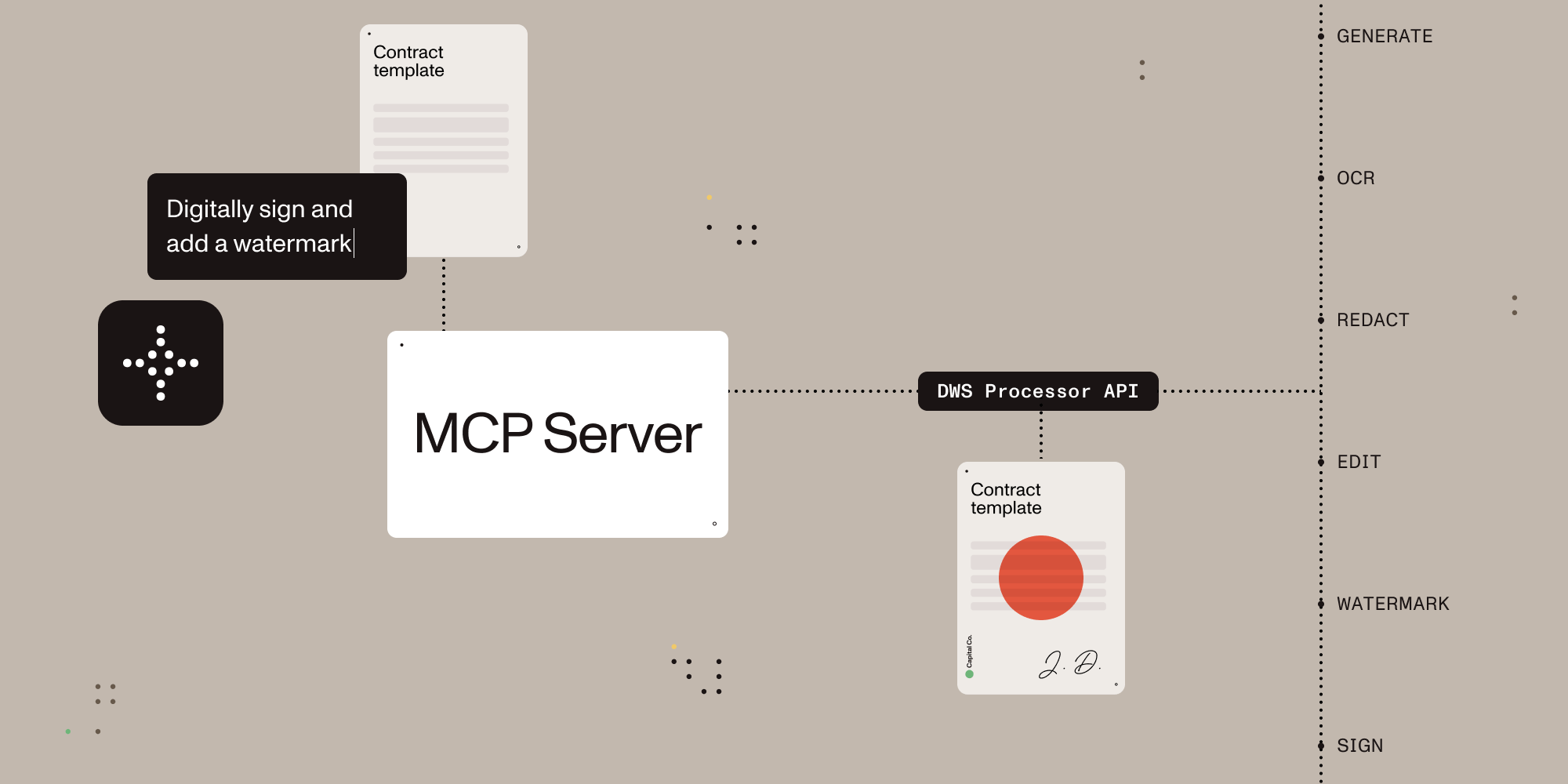
Give AI agents the power to process, sign, and transform documents.
A Model Context Protocol (MCP) server that connects AI assistants to the Nutrient Document Web Service (DWS) Processor API — enabling document creation, editing, conversion, digital signing, OCR, redaction, and more through natural language.
Once configured, you (or your AI agent) can process documents through natural language:
You: "Merge report-q1.pdf and report-q2.pdf into a single document" AI: "Done! I've merged both reports into combined-report.pdf (24 pages total)."
You: "Redact all social security numbers and email addresses from application.pdf" AI: "I found and redacted 5 SSNs and 3 email addresses. The redacted version is saved as application-redacted.pdf."
You: "Digitally sign this contract with a visible signature on page 3" AI: "I've applied a PAdES-compliant digital signature to contract.pdf. The signed document is saved as contract-signed.pdf."
You: "Convert this PDF to markdown" AI: "Here's the markdown content extracted from your document..."
You: "OCR this scanned document in German and extract the text" AI: "I've processed the scan with German OCR. Here's the extracted text..."
Sign up for free at nutrient.io/api.
Choose your platform and add the configuration:
<details> <summary><strong>Claude Desktop</strong></summary>Open Settings → Developer → Edit Config, then add:
macOS: ~/Library/Application Support/Claude/claude_desktop_config.json
Windows: %APPDATA%\Claude\claude_desktop_config.json
{
  "mcpServers": {
    "nutrient-dws": {
      "command": "npx",
      "args": ["-y", "@nutrient-sdk/dws-mcp-server"],
      "env": {
        "NUTRIENT_DWS_API_KEY": "YOUR_API_KEY_HERE",
        "SANDBOX_PATH": "/your/sandbox/directory"
        // "C:\your\sandbox\directory" for Windows
      }
    }
  }
}
Create .cursor/mcp.json in your project root:
{
  "mcpServers": {
    "nutrient-dws": {
      "command": "npx",
      "args": ["-y", "@nutrient-sdk/dws-mcp-server"],
      "env": {
        "NUTRIENT_DWS_API_KEY": "YOUR_API_KEY_HERE",
        "SANDBOX_PATH": "/your/project/documents"
        // "C:\your\project\documents" for Windows
      }
    }
  }
}
Add to ~/.codeium/windsurf/mcp_config.json:
{
  "mcpServers": {
    "nutrient-dws": {
      "command": "npx",
      "args": ["-y", "@nutrient-sdk/dws-mcp-server"],
      "env": {
        "NUTRIENT_DWS_API_KEY": "YOUR_API_KEY_HERE",
        "SANDBOX_PATH": "/your/sandbox/directory"
        // "C:\your\sandbox\directory" for Windows
      }
    }
  }
}
Add to .vscode/settings.json in your project:
{
  "mcp": {
    "servers": {
      "nutrient-dws": {
        "command": "npx",
        "args": ["-y", "@nutrient-sdk/dws-mcp-server"],
        "env": {
          "NUTRIENT_DWS_API_KEY": "YOUR_API_KEY_HERE",
          "SANDBOX_PATH": "${workspaceFolder}"
        }
      }
    }
  }
}
Any MCP-compatible client can connect using stdio transport:
NUTRIENT_DWS_API_KEY=your_key SANDBOX_PATH=/your/path npx @nutrient-sdk/dws-mcp-server
Restart the application to pick up the new MCP server configuration.
Drop documents into your sandbox directory and start giving instructions!
| Tool | Description |
|---|---|
| document_processor | All-in-one document processing: merge PDFs, convert formats, apply OCR, watermark, rotate, redact, flatten annotations, extract text/tables/key-value pairs, and more |
| document_signer | Digitally sign PDFs with PAdES-compliant CMS or CAdES signatures, with customizable visible/invisible signature appearances |
| sandbox_file_tree | Browse files in the sandbox directory (when sandbox mode is enabled) |
| directory_tree | Browse directory contents (when sandbox mode is disabled) |
| Feature | Description |
|---|---|
| Document Creation | Merge PDFs, Office docs (DOCX, XLSX, PPTX), and images into a single document |
| Format Conversion | PDF ↔ DOCX, images (PNG, JPEG, WebP), PDF/A, PDF/UA, HTML, Markdown |
| Editing | Watermark (text/image), rotate pages, flatten annotations |
| Security | Redact sensitive data (SSNs, credit cards, emails, etc.), password protection, permission control |
| Data Extraction | Extract text, tables, or key-value pairs as structured JSON |
| OCR | Multi-language optical character recognition for scanned documents |
| Optimization | Compress and linearize PDFs without quality loss |
| Annotations | Import XFDF annotations, flatten annotations |
| Digital Signing | PAdES-compliant CMS and CAdES digital signatures (via document_signer tool) |
This MCP server works with any platform that supports the Model Context Protocol:
AI can read and understand documents — but most tools stop there. Nutrient gives AI agents the ability to actually manipulate documents: merge, redact, sign, watermark, convert formats, extract structured data, and more.
The server supports sandbox mode that restricts file operations to a specific directory. Set the SANDBOX_PATH environment variable to enable it:
export SANDBOX_PATH=/path/to/sandbox/directory
npx @nutrient-sdk/dws-mcp-server
When sandbox mode is enabled:
Note: If no sandbox directory is specified, the server operates without file path restrictions. Sandbox mode is strongly recommended for security.
Processed files are saved to a location determined by the AI. To guide output placement, use natural language (e.g., "save the result to output/result.pdf") or create an output directory in your sandbox.
| Variable | Required | Description |
|---|---|---|
NUTRIENT_DWS_API_KEY | Yes | Your Nutrient DWS API key (get one free) |
SANDBOX_PATH | Recommended | Directory to restrict file operations to |
Server not appearing in Claude Desktop?
node --version)"API key invalid" errors?
env section (no extra spaces)Files not found?
SANDBOX_PATH points to an existing directorysandbox_file_tree tool to verify visible filesPlease see the contribution guidelines in CONTRIBUTING.md.
MIT License — see LICENSE for details.
Time estimate: 10-20 minutes including configuration
Prerequisites
Steps
Troubleshooting
✓ Do
✗ Don't
💡 Pro Tips
Architecture
MCP server provides file I/O operations (read, write, search, metadata) as tools Claude can invoke with natural language instructions.
Protocols
Compatibility
✓ Use when
Use for code analysis, file organization, content search, template generation, and automating repetitive file operations. Best for local development workflows.
✗ Avoid when
Avoid for system-critical files, sensitive credentials, production environments, or when file integrity is paramount. Don't use on files you can't afford to lose.
Airtable
Get secure read and write access to your Airtable databases. Learn about Airtable API features, pricing, and cost-effect




