



Most virtual team-building sessions die from two problems that have nothing to do with the activity itself: someone can't install the app on their locked-down work laptop, and half the invite list doesn't show up, so the "team" game turns into three people staring at each other. bunpav.com/play happens to sidestep both — five free multiplayer browser games, no download, no account, and every empty seat gets filled with a bot. They were built with Claude Opus 5.5, but the reason they work for a Tuesday-afternoon offsite has nothing to do with who wrote the code.
This is a guide for the person actually running the session — a manager, a People Ops lead, an EA planning an offsite icebreaker — not a review of the games themselves.
TL;DR — what organizers ask first
| Question | Direct answer |
|---|---|
| Do people need to install anything? | No — open a link in Chrome or Edge, that's it |
| Does it need a company account or license? | No account required while the platform is in testing |
| What if only half the team joins the call? | Bots fill every empty seat automatically |
| How many people can play at once? | Up to 10 per room; run parallel rooms for bigger teams |
| Will it work on a locked-down corporate laptop? | Yes — no admin rights, no executable, browser only |
| How long does a session take? | 30-45 minutes fits one meeting slot |
| Is it free? | Yes |
| Does it work on mobile for a hybrid team? | Not yet — desktop/laptop with keyboard and mouse only |
Why "no download" is the actual unlock
If you've tried to run a team activity through a corporate laptop fleet, you already know the failure mode: someone's machine doesn't allow .exe installs, someone else needs IT to approve a new app, and the 15-minute icebreaker turns into a 20-minute troubleshooting thread in Slack. It's the single biggest reason virtual team-building tools get abandoned mid-rollout, and it has nothing to do with whether the game itself is fun.
bunpav.com/play removes that step entirely. The games run as Three.js canvases in a browser tab, talking to a Bun WebSocket server for multiplayer state — there's no client to install, no admin permission prompt, and no account gate while the platform is in testing. Anyone who can open a link and click "Join any game" is in. That matters more for adoption than any single game mechanic: a 30-second setup means people actually try it instead of dropping off during the install step.
The "half the team didn't show up" problem, solved by bots
Every organizer who has run a virtual happy hour knows the other failure mode: you plan for 12, six people actually join, and now your carefully sized team game is unplayable. bunpav's games fill every open slot with a bot the moment a room starts, so a session with 4 people and a session with 14 people play out the same way — nobody sits idle waiting for a fifth player, and nobody has to explain why the "team battle" only has two people per side. There's also an offline practice mode that runs the identical game logic solo, useful if you want to demo a game to your team lead beforehand without spinning up a live room.
This is worth naming explicitly to whoever approves the activity: the RSVP-to-attendance drop-off that kills most planned team activities doesn't kill this one, because the game doesn't need a fixed headcount to work.
Which game fits which team size and energy level
Not all five games suit the same session. Here's how to match them to your group:
| Game | Best team size | Energy level | Why it fits |
|---|---|---|---|
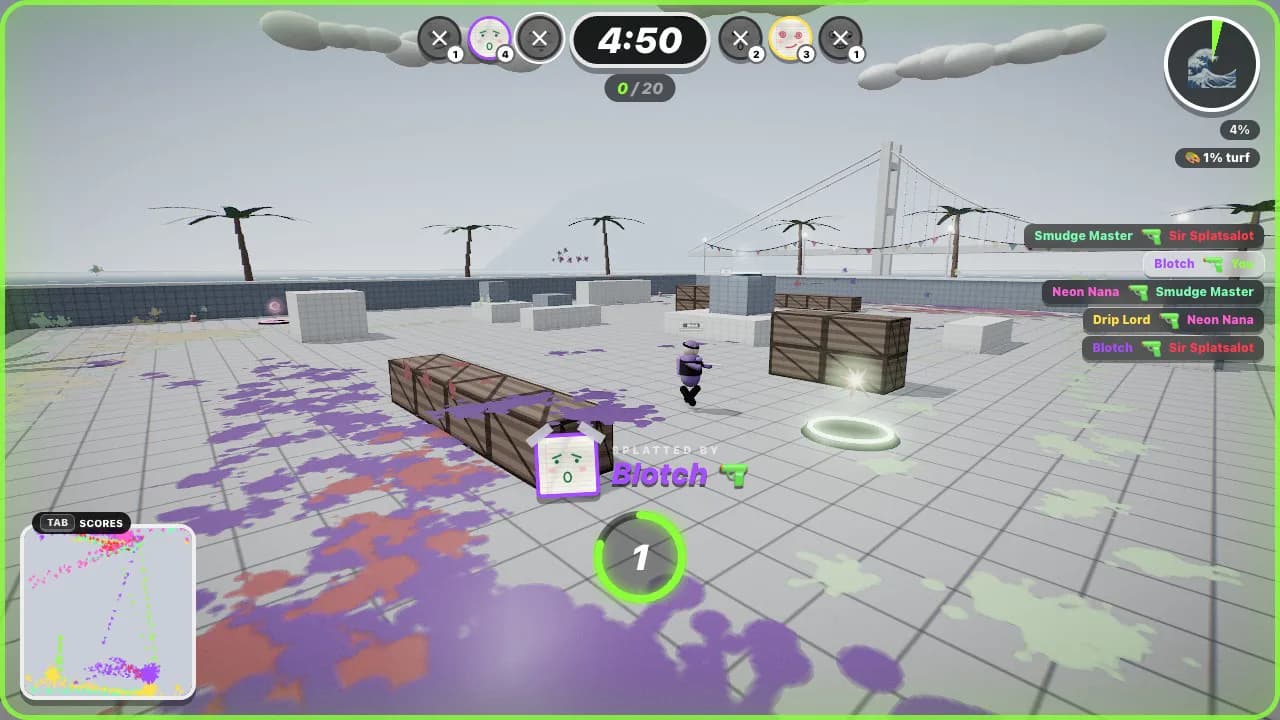
| Splat Attack | 6-10 (large group) | High, chaotic | Low skill floor — aiming a paint blaster is intuitive in the first 30 seconds; Red vs Blue team mode keeps everyone shooting at once |
| Turbo Trolley | 6-10 (large group) | High, funny | Kart racing reads as "everyone's laughing," not "everyone's competing seriously" — great low-stakes energy for a happy hour |
| Hexfall | 4-8 (co-op framing) | Focused, collaborative | Only co-op game of the five — frames the session as "the team survived together" rather than "someone won," useful when you want a collaboration message, not a competition one |
| Bonk Club | 2-6 (duel bracket) | Playful, personal | 1v1 Duel mode with a bracket format works well as a smaller icebreaker — pull two people up, everyone else watches and cheers |
| Clang! | 2-6 (duel bracket) | Skill-based | The most mechanical of the five (parries, guard-breaks); best for a smaller group that wants a real skill ladder rather than pure chaos |
Rule of thumb: for a large all-hands or a full-team offsite, open with Splat Attack or Turbo Trolley — both handle a crowded room and don't punish first-timers. For a small stand-up team wanting a quick collaborative moment, run Hexfall. For a bracket-style "watch two people duke it out" segment during a happy hour, Bonk Club or Clang! work as a spectator activity as much as a played one.
A 30-45 minute run of show
Here's a structure that fits inside a single meeting slot without needing a separate calendar block:
| Time | Segment | What to do |
|---|---|---|
| 0:00-0:05 | Setup | Drop the bunpav.com/play link in chat, walk through "create a room, share the code" once on screen share |
| 0:05-0:10 | Warm-up | Everyone joins one Splat Attack free-for-all room — low stakes, gets people used to WASD + mouse |
| 0:10-0:25 | Main event 1 | Turbo Trolley team race (split into two teams if you have 6+) — highest laughs-per-minute of the five |
| 0:25-0:35 | Main event 2 | Hexfall co-op run if you want a collaboration close, or a Bonk Club duel bracket if you want a spectator-friendly finish |
| 0:35-0:40 | Highlights | Pull up the auto-recorded highlight clips and share cards from the match — a two-minute "let's watch the best moment" segment lands well on a call |
| 0:40-0:45 | Wrap | Drop the link again for anyone who wants to keep playing async, ask for quick feedback |
Adjust the middle block based on your read of the room — swap in Clang! instead of Bonk Club if your team skews more into mechanical/competitive play, or run two Splat Attack rounds back-to-back if the group is large and you want to keep energy simple.
Tips specific to running this at work
- Skip the account step entirely. Don't ask anyone to sign up — guests can play while the platform is in testing, so the setup instruction is just "open this link."
- Use rooms with codes for a controlled session, not "Join any game." Matchmaking is great for casual solo play, but for a scheduled team session, create a room and share the 5-letter code so your whole group lands in the same match together.
- Let bots handle attrition mid-session. If someone has to drop for another meeting, the room doesn't break — a bot takes the seat and the match continues.
- Photo-tape faces if you want a personal touch. Every game supports uploading a photo that gets duct-taped onto your character, which is a small but reliably funny icebreaker moment when people see coworkers' faces on a crash-test dummy or a knight.
- Desktop only, for now. These games use pointer-lock aiming and keyboard movement, so tell hybrid attendees joining from a phone to switch to a laptop — there's no mobile-friendly control scheme yet.
Honest limitations for a work setting
- No calendar or Slack integration — you're sharing a plain link, not booking through a tool that syncs with your HR platform.
- Desktop and laptop only — anyone dialing in from a phone can watch but can't play comfortably.
- Testing-phase platform — rooms may restart during a deploy, so don't run this for anything mission-critical like a board offsite without a quick test beforehand.
- Bots are tuned for chaos, not difficulty curves — they keep a room full and playable, but they won't adapt to a specific skill level the way a matched human opponent would.
Where this comes from
bunpav.com/play's five games — Bonk Club, Hexfall, Turbo Trolley, Splat Attack and Clang! — were entirely built with Claude Opus 5.5 working in Claude Code, roughly 29,700 lines of TypeScript running on a server-authoritative Bun WebSocket backend with zero image assets and AI-generated sound design. That post covers the build in depth — the multiplayer architecture, the netcode, where Opus 5.5 needed steering — and sits alongside the broader wave of Claude-built games going viral in 2026. If you want to build something similar for your own team or product, the bunpav procedural game and audio lab and the hop-earth Bunpav build guide are good starting points.
Turbo Trolley — the highest laughs-per-minute of the five, and a good main-event pick for a large-group session.
Hexfall — the only co-op game of the five, and the one to reach for when the message is "the team survived together," not "someone won."
Recap
Corporate virtual team-building fails for boring reasons — install friction and no-shows — not because the games themselves are bad. Five free browser games at bunpav.com/play, zero downloads, bots filling every empty seat, and a 30-45 minute run of show that fits one meeting slot. Pick Splat Attack or Turbo Trolley for a big group, Hexfall for a collaboration message, and Bonk Club or Clang! for a smaller duel bracket.
Related reading
- We built 5 friendslop browser games with Claude Opus 5.5
- Claude Opus 5 games go viral — browser worlds and WebGPU craft
- bunpav: procedural 3D, Game Lab and Audio Lab
- How to build a hop-earth style AI driving game (bunpav guide)
- img2threejs: procedural photo-to-Three.js on bunpav
- Generative AI for leaders workshop
- Top generative AI workshops for software developers
Game features, player counts and session structure are accurate as of September 26, 2026; bunpav.com/play is in active development.