



Claude Code CLI has a powerful but lesser-known checkpoint restore feature that lets you revert to previous code and conversation states—similar to Cursor's checkpoint functionality—without relying on git.
Update — June 25, 2026 (v2.1.191): If you ran /clear and lost context, /rewind can now resume from before the clear — complementary to ESC × 2 checkpoints. See Claude Code 2.1.191 changelog.
The feature is activated by pressing ESC twice in rapid succession, which opens a menu with four restoration options:
- Restore code and conversation — revert both files and chat history
- Restore conversation — revert only the chat history
- Restore code — revert only file changes
- Nevermind — cancel the operation
This is particularly useful during experimentation, debugging, or when trying multiple approaches to a problem. You can quickly revert changes without the overhead of git commits or stash operations.
This article explains how to use the restore feature, when to use each option, how it compares to Cursor's checkpoints, and best practices for checkpoint-driven development.
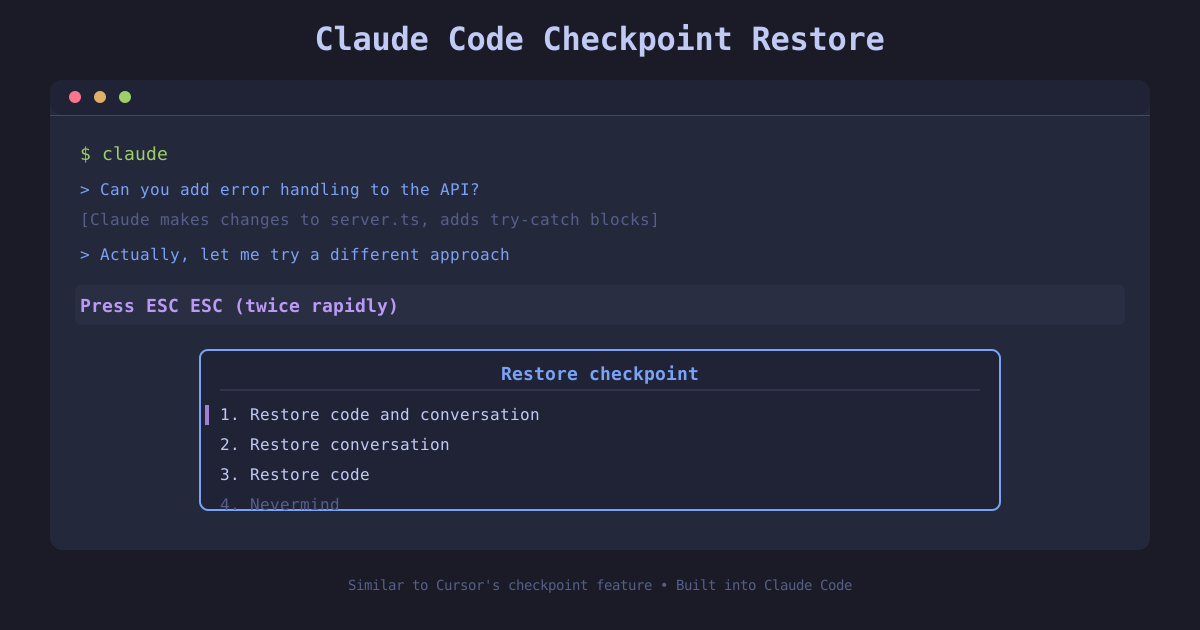 Claude Code restore checkpoint feature — ESC twice to restore
How to activate the restore menu
 Claude Code checkpoint restore diagram showing a curved arrow looping back to an earlier timeline point
The restore feature is accessed with a simple keyboard shortcut:
- Press ESC twice (rapidly, within about 1 second)
- A menu appears with four options
- Use arrow keys or number keys to select an option
- Press Enter to confirm
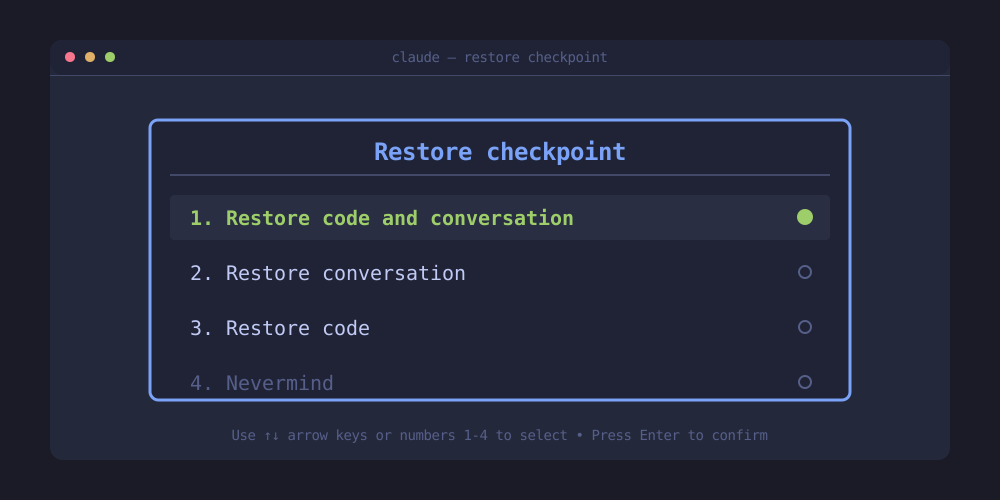 Claude Code checkpoint restore menu showing four options
What happens when you press ESC twice
# You're in an active Claude Code session
$ claude

# You've made several code changes and had a conversation
> Can you add error handling to the API?
[Claude makes changes to server.ts, adds try-catch blocks]

> Actually, let me try a different approach
# Press ESC ESC (twice rapidly)

┌─────────────────────────────────────────────────────┐
│  Restore checkpoint                                  │
├─────────────────────────────────────────────────────┤
│  1. Restore code and conversation                   │
│  2. Restore conversation                            │
│  3. Restore code                                    │
│  4. Nevermind                                       │
└─────────────────────────────────────────────────────┘
Understanding the four restore options
Each restore option serves a different use case during development:
1. Restore code and conversation
Use case: You want to completely undo both the code changes and the conversation history.
Before restore:
- server.ts modified with try-catch blocks
- 5 messages in conversation about error handling

After "Restore code and conversation":
- server.ts reverted to checkpoint state
- Conversation reverted to checkpoint state
- Fresh slate for new approach
When to use:
- You've gone down a wrong path entirely
- Both the code and conversation are no longer relevant
- You want to start fresh from a known good state
2. Restore conversation
Use case: Keep your code changes but reset the conversation context.
Before restore:
- server.ts modified with try-catch blocks (KEEP)
- 5 messages in conversation about error handling (REVERT)

After "Restore conversation":
- server.ts still has try-catch blocks
- Conversation history cleared
- Useful for explaining code to someone else with fresh context
When to use:
- You want to keep the code but explain it differently
- The conversation became cluttered or went off-topic
- You're starting a new task but want to keep recent code changes
3. Restore code
Use case: Revert code changes but preserve the conversation history.
Before restore:
- server.ts modified with try-catch blocks (REVERT)
- 5 messages in conversation about error handling (KEEP)

After "Restore code":
- server.ts reverted to checkpoint state
- Conversation history preserved
- Useful for referencing what didn't work
When to use:
- The code approach didn't work but the discussion is valuable
- You want to reference the conversation while trying a new implementation
- Debugging: keeping the analysis but reverting attempted fixes
4. Nevermind
Use case: Cancel the restore operation.
# You pressed ESC ESC by accident
# Select "Nevermind" to continue without restoring anything
Comparison with Cursor's checkpoint feature
Both Claude Code and Cursor offer checkpoint functionality, but with different approaches:
| Feature | Claude Code | Cursor |
|---|---|---|
| Activation | Press ESC twice | Dedicated checkpoint UI |
| Granularity | Code, conversation, or both | Code checkpoints |
| Session scope | Current session | Project-based |
| Git integration | Independent | Can integrate with git |
| Conversation restore | ✅ Yes | ❌ No |
| Visual timeline | ❌ No (menu-based) | ✅ Yes |
Key advantage of Claude Code: The ability to restore conversation state separately from code is unique and valuable for maintaining context during experiments.
Key advantage of Cursor: Visual checkpoint timeline makes it easier to see what changed at each checkpoint.
When to use Claude Code restore vs git
Use Claude Code restore when:
✅ Experimenting with quick iterations ✅ Trying multiple approaches in a single session ✅ You want to preserve conversation context ✅ No need for permanent version control ✅ Working on throwaway code or spikes
Use git when:
✅ You need permanent version control ✅ Collaborating with others ✅ You want detailed commit messages and history ✅ Changes need to be shared across machines ✅ You're working on production code
Best practice: Use both—Claude Code restore for rapid iteration, git for checkpoints you want to keep.
Practical workflow examples
Example 1: API design experimentation
$ claude

> Design a REST API for user authentication

# Checkpoint 1 (automatically created)
[Claude designs JWT-based auth]

> Actually, let's try session-based auth instead
[Claude implements session-based approach]

# Not happy with it
ESC ESC → "Restore code and conversation"
# Back to Checkpoint 1

> What about OAuth2 with refresh tokens?
[Claude implements OAuth2]

# This works! Commit to git
$ git add . && git commit -m "Add OAuth2 authentication"
Example 2: Debugging with conversation preservation
$ claude

> The login endpoint returns 500 errors

# Deep conversation about potential causes
# Claude suggests checking database connection, environment variables, etc.

> Try fixing the database connection timeout
[Claude modifies db.ts with new timeout settings]

# Didn't work, but the conversation analysis is valuable
ESC ESC → "Restore code"
# Code reverted, conversation preserved

> Based on your analysis above, let's try the environment variable approach
[Claude fixes .env configuration]
# This works!
Example 3: Cleaning up conversation clutter
$ claude

> Refactor the authentication module
[Long conversation with multiple tangents and clarifications]

# Code is good, but conversation is messy
ESC ESC → "Restore conversation"
# Code preserved, conversation reset

> I've refactored the auth module to use dependency injection
# Fresh conversation context for the next developer
Best practices for checkpoint-driven development
1. Know your checkpoint states
Claude Code creates automatic checkpoints at key moments (exact timing is implementation-dependent). Understanding when checkpoints are created helps you restore to the right state.
2. Use restore for experiments, git for keepers
# Experiment with Claude Code restore
ESC ESC → try approach A
ESC ESC → try approach B
ESC ESC → try approach C

# When you find the winner, commit to git
$ git add . && git commit -m "Implement approach B for auth"
3. Preserve valuable conversations
If a conversation contains valuable analysis or context, use "Restore code" instead of "Restore code and conversation" to keep the discussion.
4. Combine with /goal for autonomous checkpoints
If you're using /goal for long-running tasks (see Claude Code /goal command guide), you can use restore to revert if the autonomous agent goes off track.
> /goal All tests passing, coverage > 90%
[Claude works for 30 minutes across multiple turns]
[Results are not what you expected]

ESC ESC → "Restore code and conversation"
# Back to before /goal was invoked
Keyboard shortcut summary
| Action | Shortcut | Result |
|---|---|---|
| Open restore menu | ESC ESC (twice rapidly) | Shows 4 restore options |
| Navigate menu | Arrow keys or 1/2/3/4 | Highlight option |
| Confirm selection | Enter | Execute restore |
| Cancel | Select "Nevermind" or ESC | Close menu without restoring |
What will a checkpoint restore leave untouched?
A checkpoint is a recovery tool with a defined scope. Anthropic's checkpointing documentation distinguishes edits tracked by Claude Code from changes made outside its editing tools. Shell commands and external systems require separate care. Rewinding a conversation does not undo an email, a deployment, a database change, or a file another program modified.
Before restoring, stop active work and inspect the current diff. Note which changes belong to the experiment and which belong to someone else. In a shared checkout, an earlier checkpoint can be a poor recovery target if another developer has since changed the same files. Preserve their work and use a focused recovery path for the files you own.
If the experiment changed configuration, dependencies, or generated artifacts, inspect those separately. A restored source file may still run against a different installed package version. Likewise, reverting the prompt does not restart a server with its earlier environment. Recovery is complete only after the actual running application matches the state you intended to recover.
Worked scenario: keep the diagnosis, abandon the patch
Suppose an agent identifies a race in an upload flow, then proposes a broad refactor. The refactor fails the relevant check, but the conversation contains a useful reproduction and explanation. Restoring code while retaining the conversation can preserve that diagnosis. Afterward, ask the agent to re-read the current files before proposing a smaller fix.
State what you learned explicitly: the reproduction remains valid, the broad refactor is abandoned, and the new attempt should touch only the upload state transition. This prevents a retained conversation from encouraging the agent to act as though the rejected implementation still exists. The files and the conversation now describe different points in the experiment unless you reconnect them deliberately.
Run the original failing case again before making the next edit. If it no longer reproduces, inspect the environment and untracked files instead of assuming the checkpoint fixed the bug. A changed server process or stale generated asset can make recovery look successful without restoring the intended source state.
How should you verify a restored project?
First inspect the changed paths and the diff. Then run the smallest existing check that addresses the attempted change. For a UI edit, open the affected screen and inspect the relevant state. For a configuration experiment, restart the process if configuration is read only at startup. None of these checks can be replaced by seeing that the restore menu closed successfully.
Commit the recovered baseline when you want to keep it. That gives the next experiment a durable reference you can inspect outside Claude Code. Use a descriptive message that explains the accepted change, rather than relying on a chat transcript as the only record of why the project now behaves differently.
Checkpoints are especially helpful when the experiment is narrow, local, and easy to verify. Their limits become more important when tools have effects beyond the filesystem. Write those effects into your task notes before starting the experiment so a later restore does not create a false impression that everything has been rolled back.
Practice recovery before a complicated experiment
In a disposable project, ask for a small edit, inspect it, restore it, and inspect the diff again. Then try preserving the conversation while restoring only files. This lets you learn the interface without attaching an important task to the first attempt. Write down which changes disappeared and which remained, especially if a command created an untracked file. A recovery workflow is easier to trust when you have observed its boundaries on a simple case.
Related on explainx.ai
- Claude Code /goal command: long-running agents — set completion conditions and let Claude work autonomously
- Claude Code vs Cursor vs GitHub Copilot — compare coding workflows
- Git for beginners — keep durable project history
Bottom line
Claude Code's checkpoint restore feature (activated by pressing ESC twice) provides Cursor-style checkpoint functionality with the added benefit of separate conversation and code restoration.
The four options—restore code and conversation, restore conversation, restore code, or nevermind—give you fine-grained control over what to revert during development.
Use it for rapid experimentation during active sessions, and commit valuable changes to git for permanent version control. The combination of Claude Code checkpoints for iteration and git for persistence creates a powerful workflow for AI-assisted development.
Next time you're experimenting with Claude Code, try ESC ESC to explore different approaches without fear of losing progress.
Claude Code documentation: https://github.com/anthropics/claude-code. explainx.ai is not affiliated with Anthropic.