Electron Desktop Automation streamlines app testing with screenshots, console monitoring, project detection, and debuggi
Fetch and extract information from websites automatically
Example: Research competitor pricing, scrape product reviews, monitor news mentions
Automate 5-10 hours/week of manual web research
Track website changes, new content, price updates
Example: Monitor competitor blog for new posts, track stock availability, watch for pricing changes
Stay informed without manual checking, never miss important updates
Extract structured data from multiple websites
Example: Compile product listings from 10 e-commerce sites, aggregate job postings, collect real estate data
Build datasets 100x faster than manual copying
Interact with services that don't offer APIs
Example: Check form submissions, validate website functionality, test user flows
Automate interactions with any website, even without API
Linear
MCP server for Linear — enables Claude to interact with Linear data and workflows.
Specif-ai
Specif-ai ensures secure web API access and robust error handling, making it a top choice among API security companies f
Browser
Supercharge browser tasks with Browser MCP—AI-driven, local browser automation for powerful, private testing. Inspired b
Repomix
Optimize your codebase for AI with Repomix—transform, compress, and secure repos for easier analysis with modern AI tool
XcodeBuild MCP
By Sentry. MCP server and CLI that provides tools for AI agents working on iOS and macOS Xcode projects. Build, test, li
I recommend Electron Desktop Automation for teams standardizing on MCP; the explainx.ai page compares cleanly with sibling servers.
According to our notes, Electron Desktop Automation benefits from clear Model Context Protocol framing — fewer ambiguous “AI plugin” claims.
According to our notes, Electron Desktop Automation benefits from clear Model Context Protocol framing — fewer ambiguous “AI plugin” claims.
I recommend Electron Desktop Automation for teams standardizing on MCP; the explainx.ai page compares cleanly with sibling servers.
We wired Electron Desktop Automation into a staging workspace; the listing’s GitHub and npm pointers saved time versus hunting across READMEs.
Electron Desktop Automation is among the better-indexed MCP projects we tried; the explainx.ai summary tracks the official description.
We evaluated Electron Desktop Automation against two servers with overlapping tools; this profile had the clearer scope statement.
Electron Desktop Automation reduced integration guesswork — categories and install configs on the listing matched the upstream repo.
Strong directory entry: Electron Desktop Automation surfaces stars and publisher context so we could sanity-check maintenance before adopting.
Electron Desktop Automation is a well-scoped MCP server in the explainx.ai directory — install snippets and categories matched our Claude Code setup.
showing 1-10 of 32
Share your MCP server with the developer community
 by halilural
Select a client to integrate this server.
Claude Desktop configuration
{
  "mcpServers": {
    "electron": {
      "command": "npx",
      "args": [
        "-y",
        "electron-mcp-server"
      ]
    }
  }
}Automates and debugs Electron desktop applications through Chrome DevTools Protocol without requiring app modifications. Provides AI-powered control over UI interactions, screenshot capture, and real-time monitoring.
Electron Desktop Automation is a community-built MCP server published by halilural that provides AI assistants with tools and capabilities via the Model Context Protocol. Electron Desktop Automation streamlines app testing with screenshots, console monitoring, project detection, and debuggi It is categorized under browser automation, developer tools.
You can install Electron Desktop Automation in your AI client of choice. Use the install panel on this page to get one-click setup for Cursor, Claude Desktop, VS Code, and other MCP-compatible clients. This server runs locally on your machine via the stdio transport.


A powerful Model Context Protocol (MCP) server that provides comprehensive Electron application automation, debugging, and observability capabilities. Supercharge your Electron development workflow with AI-powered automation through Chrome DevTools Protocol integration.
See the Electron MCP Server in action:
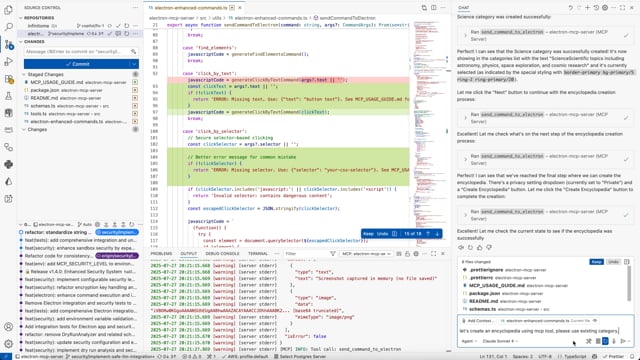
Watch how easy it is to automate Electron applications with AI-powered MCP commands.
Transform your Electron development experience with AI-powered automation:
Configurable security levels to balance safety with functionality:
Configure the security level and other settings through your MCP client configuration:
VS Code MCP Settings:
{
  "mcp": {
    "servers": {
      "electron": {
        "command": "npx",
        "args": ["-y", "electron-mcp-server"],
        "env": {
          "SECURITY_LEVEL": "balanced",
          "SCREENSHOT_ENCRYPTION_KEY":"your-32-byte-hex-string"
        }
      }
    }
  }
}
Claude Desktop Configuration:
{
  "mcpServers": {
    "electron": {
      "command": "npx",
      "args": ["-y", "electron-mcp-server"],
      "env": {
        "SECURITY_LEVEL": "balanced",
        "SCREENSHOT_ENCRYPTION_KEY":"your-32-byte-hex-string"
      }
    }
  }
}
Alternative: Local .env file (for development):
# Create .env file in your project directory
SECURITY_LEVEL=balanced
SCREENSHOT_ENCRYPTION_KEY=your-32-byte-hex-string
Security Level Behaviors:
| Level | UI Interactions | DOM Queries | Property Access | Assignments | Function Calls | Risk Threshold |
|---|---|---|---|---|---|---|
strict | ❌ Blocked | ❌ Blocked | ✅ Allowed | ❌ Blocked | ❌ None allowed | Low |
balanced | ✅ Allowed | ✅ Allowed | ✅ Allowed | ❌ Blocked | ✅ Safe UI functions | Medium |
permissive | ✅ Allowed | ✅ Allowed | ✅ Allowed | ✅ Allowed | ✅ Extended UI functions | High |
development | ✅ Allowed | ✅ Allowed | ✅ Allowed | ✅ Allowed | ✅ All functions | Critical |
Environment Setup:
.env.example to .envSECURITY_LEVEL to your desired levelcp .env.example .env
# Edit .env and set SECURITY_LEVEL=balanced
Instead of raw JavaScript eval, use these secure commands:
// ✅ Secure button clicking
{
  "command": "click_by_text",
  "args": { "text": "Create New Encyclopedia" }
}

// ✅ Secure element selection
{
  "command": "click_by_selector",
  "args": { "selector": "button[title='Create']" }
}

// ✅ Secure keyboard shortcuts
{
  "command": "send_keyboard_shortcut",
  "args": { "text": "Ctrl+N" }
}

// ✅ Secure navigation
{
  "command": "navigate_to_hash",
  "args": { "text": "create" }
}
See SECURITY_CONFIG.md for detailed security documentation.
The most common mistake when using this MCP server is incorrect argument structure for the send_command_to_electron tool.
{
  "command": "click_by_selector",
  "args": "button.submit-btn"  // ❌ Raw string - WRONG!
}
{
  "command": "click_by_selector",
  "args": {
    "selector": "button.submit-btn"  // ✅ Object with selector property
  }
}
| Command | Required Args | Example |
|---|---|---|
click_by_selector | {"selector": "css-selector"} | {"selector": "button.primary"} |
click_by_text | {"text": "button text"} | {"text": "Submit"} |
fill_input | {"value": "text", "selector": "..."} or {"value": "text", "placeholder": "..."} | {"placeholder": "Enter name", "value": "John"} |
send_keyboard_shortcut | {"text": "key combination"} | {"text": "Ctrl+N"} |
eval | {"code": "javascript"} | {"code": "document.title"} |
get_title, get_url, get_body_text | No args needed | {} or omit args |
get_page_structure or debug_elements// Step 1: Understand the page
{
"command": "get_page_structure"
}
// Step 2: Click button using text (most reliable)
{
"command": "click_by_text",
"args": {
"text": "Create New Encyclopedia"
}
}
// Step 3: Fill form field
{
"command": "fill_input",
"args": {
"placeholder": "Enter encyclopedia name",
"value": "AI and Machine Learning"
}
}
// Step 4: Submit with selector
{
"command": "click_by_selector",
"args": {
"selector": "button[type='submit']"
}
}
| Error | Cause | Solution |
|---|---|---|
| "The provided selector is empty" | Passing string instead of object | Use {"selector": "..."} |
| "Element not found" | Wrong selector | Use get_page_structure first |
| "Command blocked" | Security restriction | Check security level settings |
| "Click prevented - too soon" | Rapid consecutive clicks | Wait before retrying |
Enterprise-grade security built for safe AI-powered automation:
eval, file system access, and network requests are blocked by defaultSafety First: Every command is analyzed, validated, and executed in a secure sandbox before reaching your application.
[, and returns structured data to Claude.
Protocols
Compatibility
✓ Use when
Use for research automation, content monitoring, data aggregation from multiple sources, and when official APIs don't exist. Best for read-only information gathering.
✗ Avoid when
Avoid for sites with APIs (use API instead), sites that explicitly forbid scraping, when data is copyrighted, or for login-required content without proper authorization.
n8n
n8n offers conversational workflow automation, enabling seamless software workflow creation and management without platf




