Agent Droid Bridge gives AI agents programmatic control over Android devices and emulators via ADB, exposed as an MCP se
 by Neverlow512·
Fetch and extract information from websites automatically
Example: Research competitor pricing, scrape product reviews, monitor news mentions
Automate 5-10 hours/week of manual web research
Track website changes, new content, price updates
Example: Monitor competitor blog for new posts, track stock availability, watch for pricing changes
Stay informed without manual checking, never miss important updates
Extract structured data from multiple websites
Example: Compile product listings from 10 e-commerce sites, aggregate job postings, collect real estate data
Build datasets 100x faster than manual copying
Interact with services that don't offer APIs
Example: Check form submissions, validate website functionality, test user flows
Automate interactions with any website, even without API
Omnisearch
Omnisearch unifies search by selecting top providers like Tavily, Brave, and Perplexity for flexible, enhanced content r
Fetch with Images
Fetch with Images integrates web scraping and image compresser com tools to scrape any website and optimize images effic
Brave Search
Enhance your AI assistant with Brave Search and an MCP server for powerful web & local business queries—an alternative t
ZoomEye MCP Server
ZoomEye MCP Server — lightweight ZoomEye client to query the ZoomEye API for fast internet asset search and discovery.
SearXNG Search
Use SearXNG metasearch engine for private web searches, a great alternative to the Duck Duck Go search engine and browse
We evaluated agent-droid-bridge against two servers with overlapping tools; this profile had the clearer scope statement.
agent-droid-bridge is a well-scoped MCP server in the explainx.ai directory — install snippets and categories matched our Claude Code setup.
Strong directory entry: agent-droid-bridge surfaces stars and publisher context so we could sanity-check maintenance before adopting.
agent-droid-bridge has been reliable for tool-calling workflows; the MCP profile page is a good permalink for internal docs.
Useful MCP listing: agent-droid-bridge is the kind of server we cite when onboarding engineers to host + tool permissions.
agent-droid-bridge reduced integration guesswork — categories and install configs on the listing matched the upstream repo.
Useful MCP listing: agent-droid-bridge is the kind of server we cite when onboarding engineers to host + tool permissions.
agent-droid-bridge is among the better-indexed MCP projects we tried; the explainx.ai summary tracks the official description.
I recommend agent-droid-bridge for teams standardizing on MCP; the explainx.ai page compares cleanly with sibling servers.
agent-droid-bridge reduced integration guesswork — categories and install configs on the listing matched the upstream repo.
showing 1-10 of 74
Share your MCP server with the developer community
Select a client to integrate this server.
Claude Desktop configuration
{"mcpServers":{"agent-droid-bridge":{"command":"uvx","args":["agent-droid-bridge"],"env":{"ADB_EXECUTION_MODE":"unrestricted","ADB_ALLOW_SHELL":"true"}}}}An MCP server that connects AI agents to Android devices and emulators over ADB for mobile automation, app testing, and reverse engineering.
agent-droid-bridge is a community-built MCP server published by Neverlow512 that provides AI assistants with tools and capabilities via the Model Context Protocol. Agent Droid Bridge gives AI agents programmatic control over Android devices and emulators via ADB, exposed as an MCP se It is categorized under search web. This server exposes 13 tools that AI clients can invoke during conversations and coding sessions.
You can install agent-droid-bridge in your AI client of choice. Use the install panel on this page to get one-click setup for Cursor, Claude Desktop, VS Code, and other MCP-compatible clients. This server runs locally on your machine via the stdio transport.




Agent Droid Bridge is an MCP server that connects AI agents to Android devices and emulators over ADB. It is built for mobile automation, app testing, dynamic analysis, and reverse engineering: exposing the full surface of ADB as structured tools that any MCP-compatible AI client can call directly. If ADB can do it, an agent can do it.
⭐ If you like the project, a star helps others find it. ⭐
Note: Purpose-built tools return structured, minimal responses instead of raw XML dumps, keeping agent workflows fast and context consumption low, while keeping performance high.

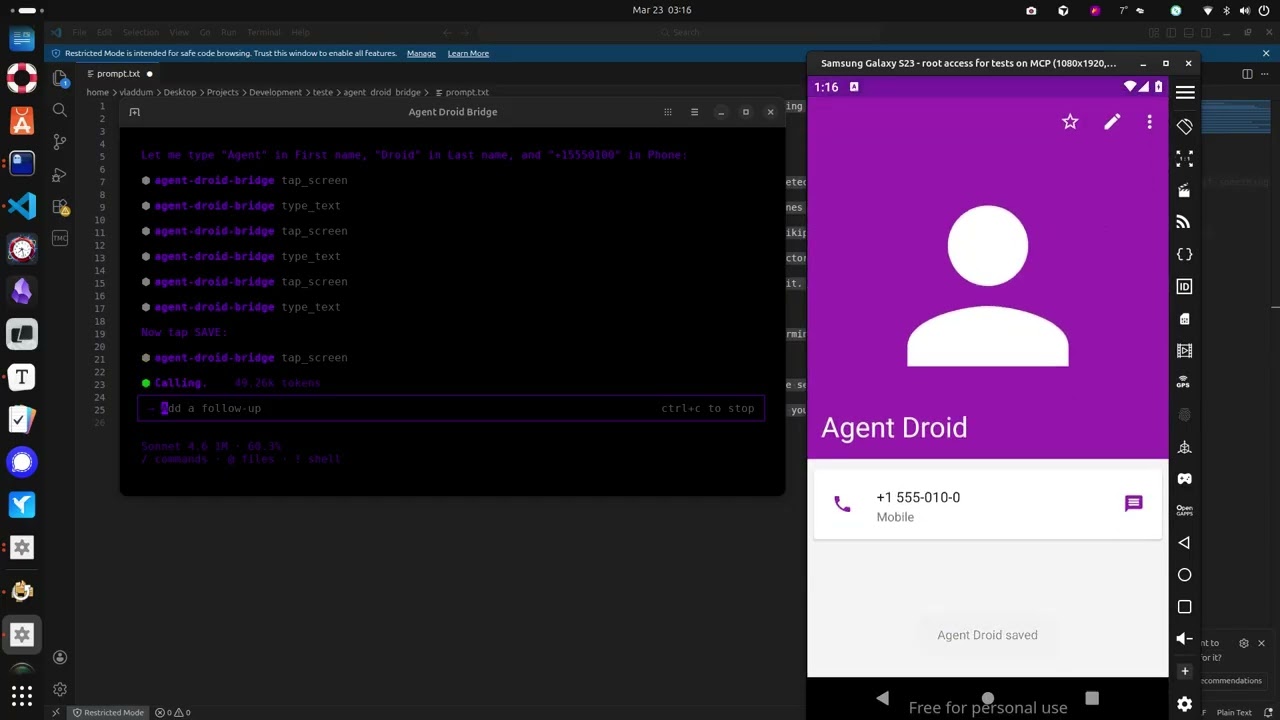
The demo above runs through a few straightforward tasks to show what a connected agent can do, and this is just scratching the surface:
shlex — no shell injection possibleunrestricted (default, with optional shell denylist) and restricted (allowlist-only — only explicitly permitted shell commands are allowed); set ADB_EXECUTION_MODE=restricted to enableADB_ALLOW_SHELL=false to block all adb shell commands entirely, regardless of modetools.denied in adb_config.yaml to hide specific MCP tools from the agent at server startup — all filtering enforced at the server leveluvx agent-droid-bridge
No cloning or virtual environments needed. Requires Python 3.11+ and ADB installed on your host.
uvx is provided by uv. If you don't have it: curl -LsSf https://astral.sh/uv/install.sh | sh
To install from source instead, see docs/setup.md — Option B.
To verify the install: uvx agent-droid-bridge --help
{
  "mcpServers": {
    "agent-droid-bridge": {
      "command": "uvx",
      "args": ["agent-droid-bridge"],
      "env": {
        "ADB_EXECUTION_MODE": "unrestricted",
        "ADB_ALLOW_SHELL": "true"
      }
    }
  }
}
agent-droid-bridge MCP toolsFull setup guide: docs/setup.md
| Tool | What it does |
|---|---|
get_ui_hierarchy | Returns the current screen as an XML UI hierarchy |
take_screenshot | Captures the screen as a base64-encoded PNG |
tap_screen | Sends a tap gesture at pixel coordinates |
swipe_screen | Sends a swipe gesture between two points over a given duration |
type_text | Types text into the focused input field |
press_key | Sends an Android keycode event (Back, Home, Enter, etc.) |
launch_app | Launches an app by its package/activity component name |
execute_adb_command | Runs an arbitrary ADB or ADB shell command |
list_devices | Lists all Android devices currently visible to ADB with their serial, state, and model |
snapshot_ui | Takes a lightweight UI snapshot and returns a token for use with detect_ui_change |
detect_ui_change | Polls for a UI change after an action; accepts a snapshot token as baseline; returns hierarchy only when requested |
get_screen_elements | Parses the UI hierarchy and returns structured elements with coordinates and interaction properties; supports tappable, interactive, input, and all modes |
get_screen_text | Returns all visible text on screen sorted top-to-bottom, as plain text |
Full parameter reference: docs/tools.md
The server is configurable via adb_config.yaml and environment variables. Tuneable parameters include the ADB binary path, command timeouts, log level, execution mode, shell filtering rules, and tool visibility. Full reference: docs/configuration.md.
| File | Description |
|---|---|
| docs/setup.md | Prerequisites, installation, and MCP client configuration |
| docs/tools.md | Full parameter reference for all 13 tools |
| docs/configuration.md | Reference for adb_config.yaml and environment variables |
Contributions are welcome. See CONTRIBUTING.md for guidelines on setup, code standards, and submitting pull requests.
To report a security vulnerability, follow the process in SECURITY.md — do not open a public issue.
Time estimate: 20-40 minutes including configuration and testing
Prerequisites
Steps
Troubleshooting
✓ Do
✗ Don't
💡 Pro Tips
Architecture
MCP server handles HTTP requests, HTML parsing, JavaScript rendering (if headless browser), and returns structured data to Claude.
Protocols
Compatibility
✓ Use when
Use for research automation, content monitoring, data aggregation from multiple sources, and when official APIs don't exist. Best for read-only information gathering.
✗ Avoid when
Avoid for sites with APIs (use API instead), sites that explicitly forbid scraping, when data is copyrighted, or for login-required content without proper authorization.




